Turn on suggestions
Auto-suggest helps you quickly narrow down your search results by suggesting possible matches as you type.
Showing results for
Let's perform some steps to fix the bank connection issue in the system, @chris231.
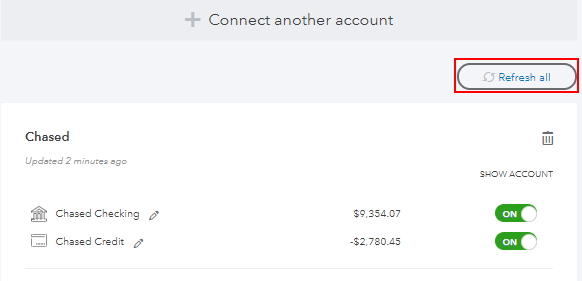
Just to confirm, are you receiving an error message when trying to update it manually by clicking Refresh all? May I know the name of your bank? This way, I can check if we have any open reports and provide the correct resolution to your concern. You can also log in to your online banking website to check some notifications that may need your attention.
To help isolate the issue in the meantime, I recommend running QuickBooks Self-Employed (QBSE) a private browser since this is free from cache data. This way, we can check to see if this is a browser-related issue or not.
To open a private browser, you can press Ctrl + Shift + P when using Microsoft Edge and Mozilla Firefox. For Safari, press Command + Shift +N and press Ctrl + Shift + N for Google Chrome.
If you successfully download your online banking transactions in QBSE, you can start clearing the browser cache to get a clean slate for your browser.
Alternatively, I suggest using other compatible browsers if it persists. Once done, try to sign back into your QuickBooks Self-Employed account. Then, manually refresh your bank account again to see if it works.
In case you receive a specific error, here are a few articles on how to fix them:
Additionally, I suggest contacting our QuickBooks Self-Employed Support Team if the troubleshooting comes with no success. They can review your account and double-check why the bank not working.
Please remember to update and tag me here (@Jovychris_A) for additional assistance about online banking in QBSE. I'm anytime ready to help. Take care and have a great weekend!
Let's perform some steps to fix the bank connection issue in the system, @chris231.
Just to confirm, are you receiving an error message when trying to update it manually by clicking Refresh all? May I know the name of your bank? This way, I can check if we have any open reports and provide the correct resolution to your concern. You can also log in to your online banking website to check some notifications that may need your attention.
To help isolate the issue in the meantime, I recommend running QuickBooks Self-Employed (QBSE) a private browser since this is free from cache data. This way, we can check to see if this is a browser-related issue or not.
To open a private browser, you can press Ctrl + Shift + P when using Microsoft Edge and Mozilla Firefox. For Safari, press Command + Shift +N and press Ctrl + Shift + N for Google Chrome.
If you successfully download your online banking transactions in QBSE, you can start clearing the browser cache to get a clean slate for your browser.
Alternatively, I suggest using other compatible browsers if it persists. Once done, try to sign back into your QuickBooks Self-Employed account. Then, manually refresh your bank account again to see if it works.
In case you receive a specific error, here are a few articles on how to fix them:
Additionally, I suggest contacting our QuickBooks Self-Employed Support Team if the troubleshooting comes with no success. They can review your account and double-check why the bank not working.
Please remember to update and tag me here (@Jovychris_A) for additional assistance about online banking in QBSE. I'm anytime ready to help. Take care and have a great weekend!


You have clicked a link to a site outside of the QuickBooks or ProFile Communities. By clicking "Continue", you will leave the community and be taken to that site instead.