Hello there, Elliot. Let's perform some troubleshooting steps to help your bank transactions display under the Bank Transactions tab in QuickBooks Online.
Before we start, could you please provide the name of your bank? This will help us create a more tailored solution for you.
QuickBooks downloads transactions only after they have officially posted to your bank account. For instance, pending or processing payments will not be imported.
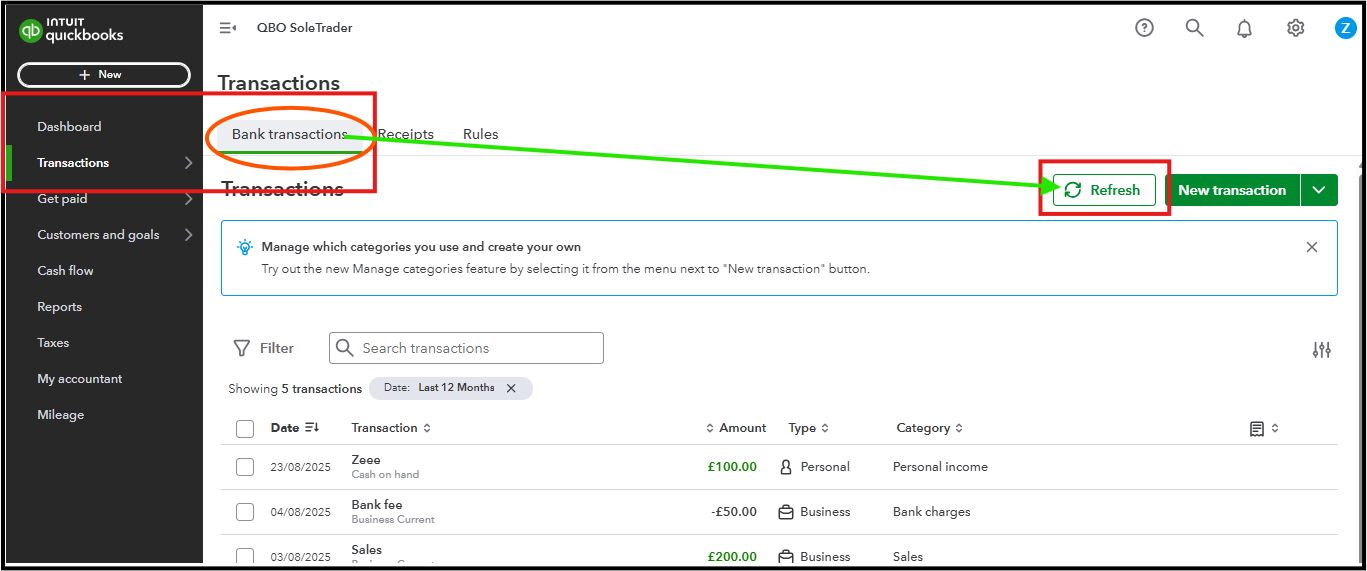
Since you haven't seen transactions, we can manually refresh the bank connection in QBO to restart the download process.
Here’s how to do it:
- From the left menu, select Transactions.
- Go to Banking.
- Click the Refresh button in the top right-hand corner.
If your transactions are still missing, we can double-check your bank connection status. If your bank connection has expired, QuickBooks will not be able to import new transactions until you reconnect and grant permission again.
Also, I recommend logging into your bank's website and checking for any notifications or alerts that may restrict QBO from connecting to your account.
If the transactions still don’t show up after refreshing or reconnecting your bank feed, you can manually upload them into QuickBooks Online.
If you have follow-up questions specific to the error message you're getting, let me know by adding a comment below.


