Turn on suggestions
Auto-suggest helps you quickly narrow down your search results by suggesting possible matches as you type.
Showing results for
Hello, I am having an issue linking to Truist Bank with my QBO Simple Start so that I can reconcile. I have only been using QBO since September. I had no problem connecting in September or October. But now, in November, it will not connect. I see other conversations in this community about Error 185, but they are all over a year old, and I don't see any suggestion that helps me. I normally use Windows 10 and Chrome. I have tried other computers, other browsers, and incognito, but I always get the same result: I go to Bank Transactions and click "Link Account". I choose Truist Bank and log in. Then I get the security number and enter that. So far, all is good. The next screen is "Connect an Account".. Both of my accounts are there, but they are not clickable. The "Connect" button is also not clickable. There is no security question for me to answer. I cannot proceed any further. I think the bank is requiring another security question to be answered before it will let my QBO to connect, but I cannot see that. I just get an email saying "Update your Security Info" and that I need to fix Error 185. I have logged in to my bank account but there is no notification for me to address there. I have called my bank and they have no idea what I am talking about. This seems like it should be a simple fix if I could pinpoint how to do that, but I have spent many hours with no luck. I appreciate any help. In case I don't get back to this spot to check for answers, my email is [email address removed]
Thank you for taking the initiative to address the issue with connecting Truist Bank to QuickBooks Online. We appreciate the steps you’ve already taken to resolve Error 185, Evalynn.
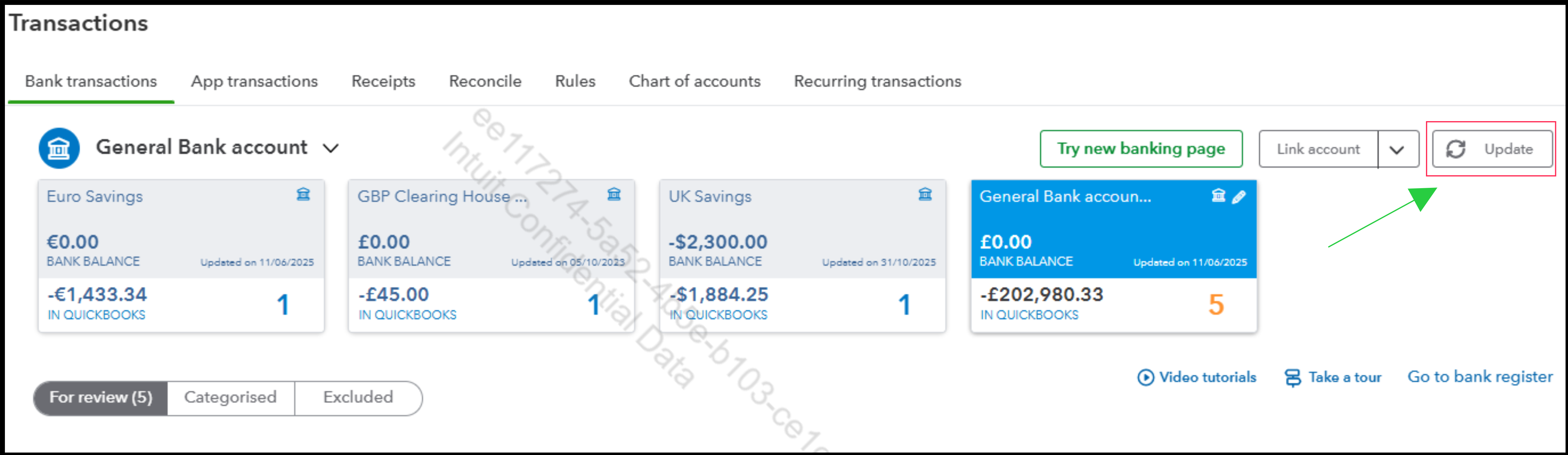
The accounts you mentioned may already be linked in QuickBooks Online, which could explain why the Connect button appears greyed out. If the connection process is not prompting security questions or code verification, we can manually refresh the connection to trigger these prompts.
Here's how:
If the issue persists, we recommend contacting our QuickBooks Online phone support team for further assistance. Our specialists have the tools to investigate this matter thoroughly and help guide you to a resolution.
Alternatively, you can manually import transactions from Truist Bank to ensure your records are up-to-date for reconciliation.
If you have any further questions or require additional assistance, please add a comment below. We are here to help.
Thank you for your response. I have tried this method and when I click the "Update" button it seems to be doing something. It doesn't ask for any security information and it ends up with the same information I started with. That is, the account was opened in July 2025 but no transactions before Sept 30th are showing so I am unable to reconcile August and September. Thank you for the phone support information. I will give them a call.


You have clicked a link to a site outside of the QuickBooks or ProFile Communities. By clicking "Continue", you will leave the community and be taken to that site instead.


