Hello there, Diligentpropertytaunton.
Could you clarify whether by "import" you mean manually uploading transactions or connecting your bank to QuickBooks? If you are manually importing transactions, there’s no need to adjust the date range as long as the transaction dates are accurate and require no changes.
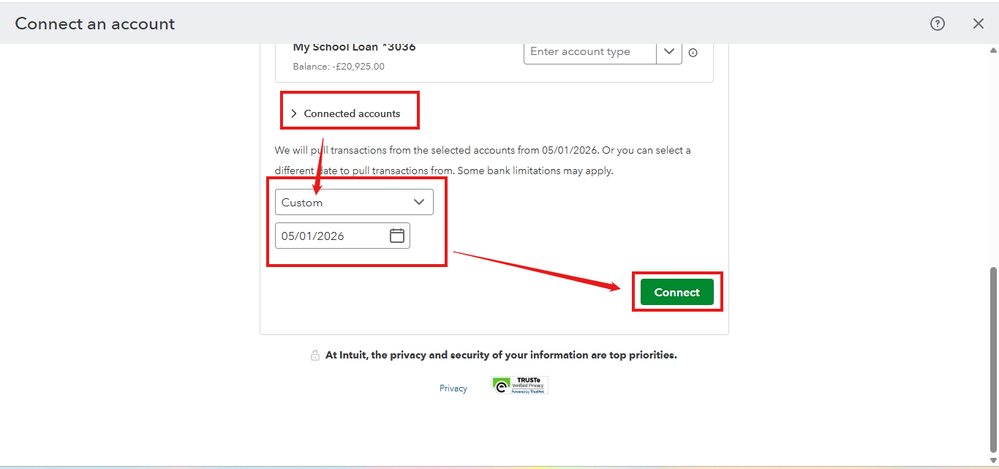
However, if you are referring to the bank linking process, you can adjust the date range during setup by selecting Custom under Connected accounts. Please note that the range of transactions you can retrieve depends on your bank’s limitations. Some banks only allow transactions up to 90 days old to be retrieved. For older transactions, you’ll need to upload them manually.
Refer to the screenshot below for guidance on editing the transaction date range:
If the bank transactions are already downloaded or imported, here’s how you can edit the date range:
- Go to All apps, and select Accounting.
- Click on Bank Transactions.
- Choose the bank account where the transactions were imported.
- Select the All dates drop-down menu and filter the date range as desired.
- Hit Apply to view transactions within the selected range.
Please note that if your account is already linked to QuickBooks, you can edit the date range only for the transactions that were imported.
If you have further questions, feel free to reach out to us. We're here to assist you!


