The way customer payments are displayed depends on the actual or specific transaction details, Sharon. I'm here to help clarify how the program handles these payments.
In QuickBooks Online (QBO), payments are linked to specific customer invoices at the time they're received and recorded. If you’re referring to transactions imported from your bank, their appearance depends on the details provided by your financial institution.
However, if you’re not referring to bank feed transactions, you can view customer payments in a more consolidated way, by running the Transaction List by Customer report. This report shows all transactions per customer and can be customized to display payments only.
Here's how:
- Go to the Reports section.
- In the search bar, type Transaction List by Customer.
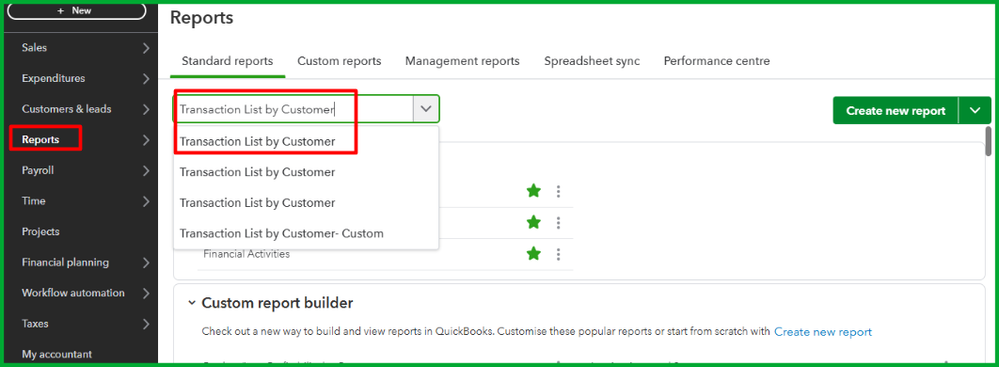
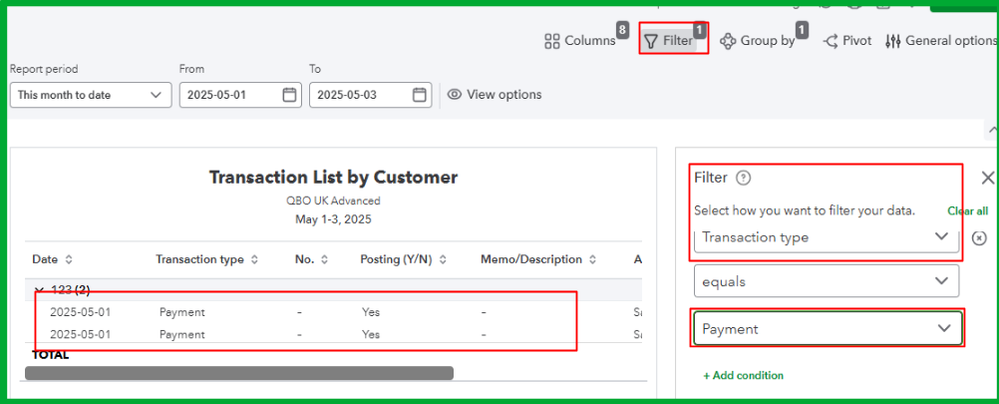
- Click the Filter dropdown menu and choose Transaction Type.
- Select Payment in the third dropdown box.
Additionally, for detailed guidance on how to review, categorize, and manage transactions imported from your bank, refer to this article: Categorize online bank transactions in QuickBooks Online.
I'm just a quick post away if you need a helping hand in managing your customer payments in QuickBooks Online. Feel free to tag me in your comments.


