Hi there, @amaazing accountancy.
I recommend first verifying if your subscription is active. If your billing information is outdated or a payment failed, QuickBooks Online (QBO) may temporarily suspend your payroll features, requiring reactivation before use. Here's how to verify:
- Navigate to the Gear icon.
- Select Subscriptions and billing.
- Confirm that your Payroll service shows a Subscribed status.
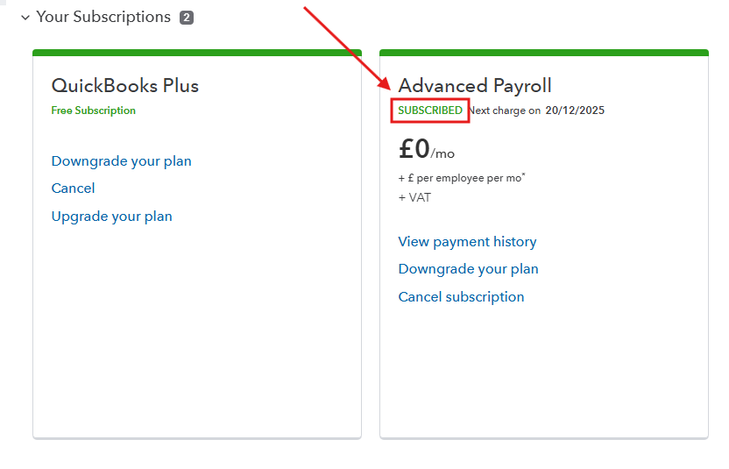
Also, please ensure you complete any pending tasks on your To-Do list before running your payroll. QBO often restricts payroll functionality if critical, required steps (like Principal Officer verification or tax setup) have not been fully completed and synced with Intuit's servers.
If the issue still occurs after verifying your subscription is active and completing all items on your To-Do list, please refresh your QBO page. Then, log out, close your browser, reopen it, and log back in. This process forces your browser and the QuickBooks servers to re-establish a secure connection, which resolves temporary viewing or access issues by re-downloading the latest account data.
If the issue still persists, the best course of action is to contact the QuickBooks Payroll Support Team directly. They have the tools to check the exact reason for the hold and guide you through the fastest resolution steps. Here's how to contact them:
- Sign in to your QBO account.
- Go to the Help (?) icon in the upper-right corner.
- Select the Search tab and click an article.
- Click the Contact Us button at the bottom and enter a brief description of your concern (e.g., "Payroll account on hold").
- Choose to Start a chat or Have us call you.
Our Live Support Team is available during the following hours:
- Callback times: Monday to Friday, 8:00 AM to 6:00 PM
- Live chat: Monday to Friday, 8:00 AM to 10:00 PM | Weekends, 8:00 AM to 6:00 PM
Please feel free to use the Reply button below if you have any additional questions.


