Hi there, Abdulhusein.
Thanks for reaching out! I understand how concerning it can be when your dashboard balances don’t align with your reports. Let’s dive in and figure this out together.
The balance discrepancies could stem from a few potential factors, such as:
- Transactions that haven’t been properly categorized or reconciled yet.
- Differences in filters or date ranges applied between the reports and the dashboard.
- Petty cash or cash in hand accounts that might have uncleared or missing transactions.
To get started, could you let me know which specific report you’re generating and comparing against the dashboard? I’d recommend double-checking the date range and filters applied to ensure they match. Here’s how you can adjust the date range in reports:
- Locate the Report icon on the left side of the panel. Open the report.
- Locate the Report period box at the top of the report screen.
- You can also select the date range that matches your dashboard or the period you're trying to review.
- Apply the filters and run the report again by clicking the refresh icon.
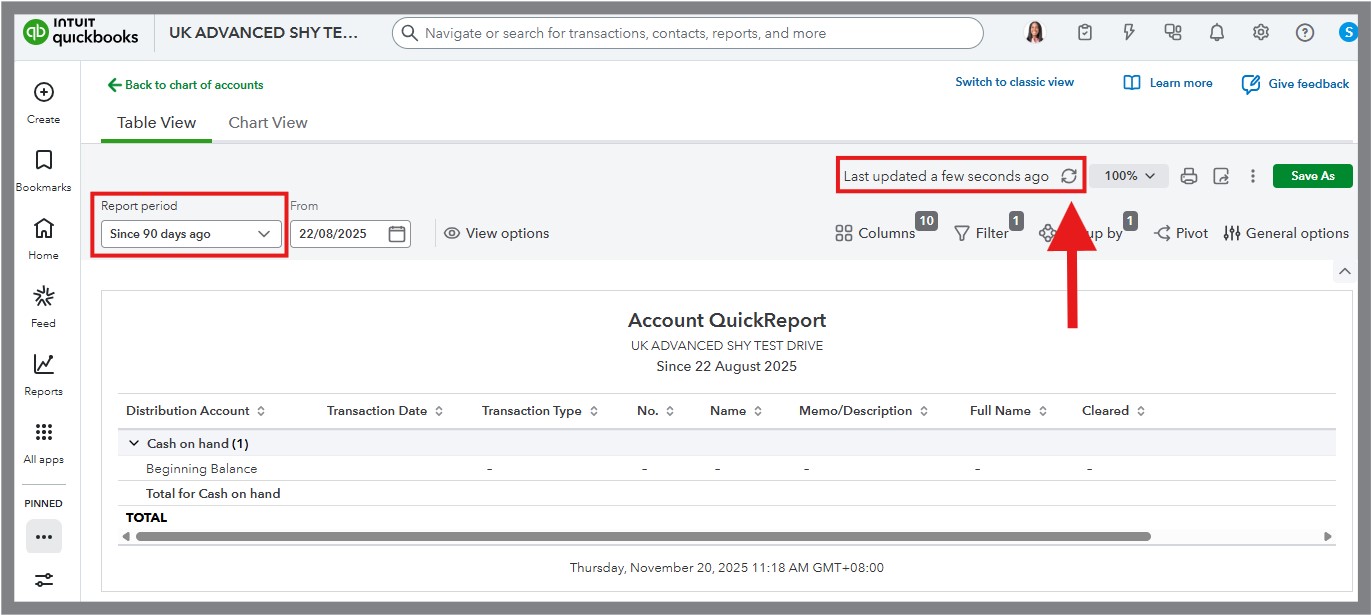
You can then compare the balances to see if everything aligns. If they are still showing discrepancies, it might help to review the transactions in those accounts for anything uncleared or missing.
I’d love to hear back from you once you’ve had a chance to try this. And if something still seems off, feel free to share more details in comment section. I’m happy to walk through it with you step by step. Take care!


