Hello, Clare. QuickBooks Online don't currently have an option to manually assign specific approvers to individual invoices without using the Workflow feature.
The Workflow feature is currently the only built-in tool in QuickBooks Online for invoice approvals. If workflows don’t work for your specific needs, we recommend looking into third-party apps that integrates with QuickBooks Online. These apps often provide more advanced options for managing invoice approvals.
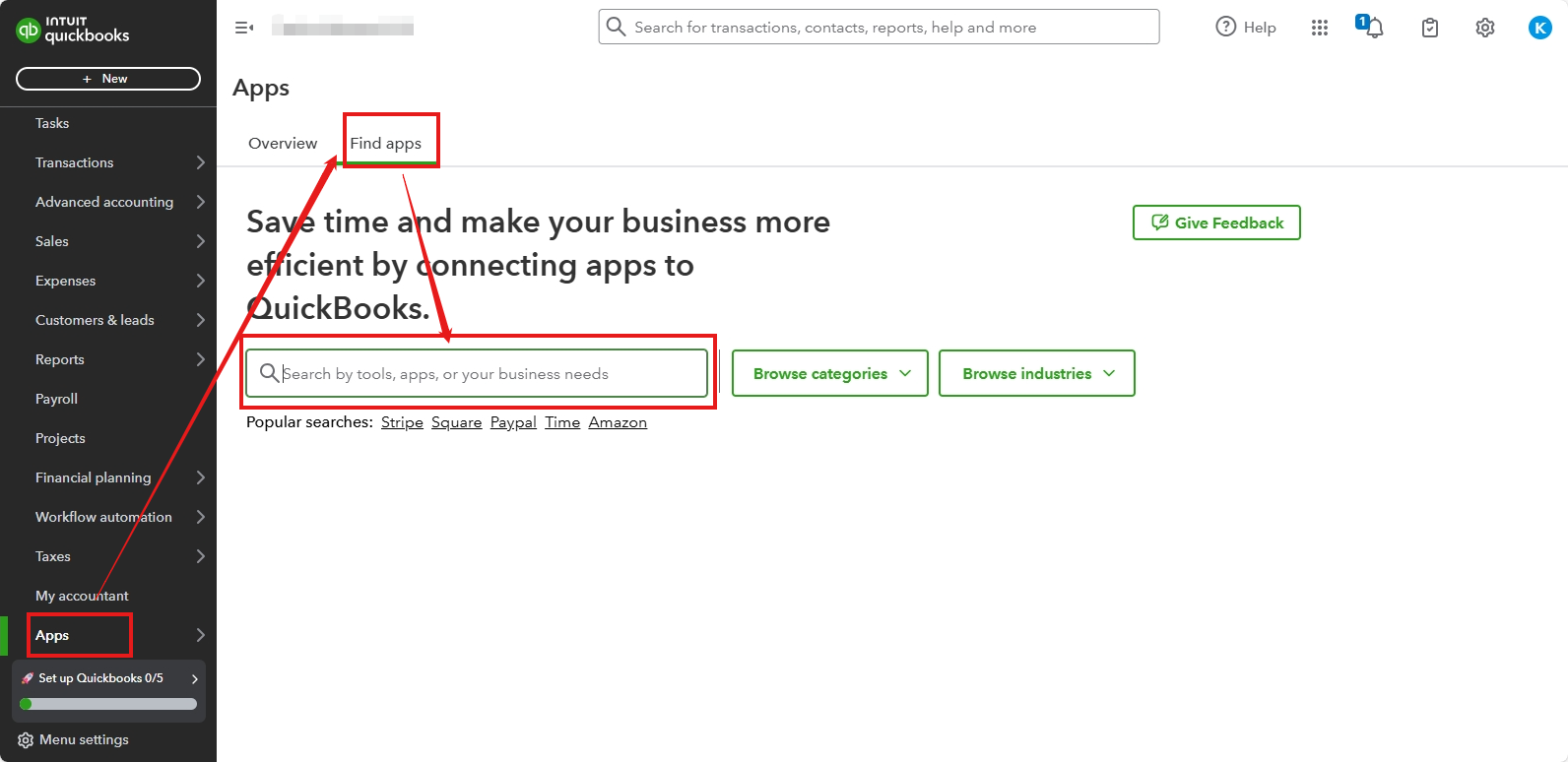
Here’s how to find a third-party app:
- Click the Apps menu on the left side of your screen.
- Select Find Apps.
- Type keywords like “Invoice Approval” into the Search bar to find an app that fits your needs.
We understand that being able to assign approvers during invoice entry would be very helpful. While this feature isn’t available yet, we recommend sharing your feedback with our product development team. Your suggestions help guide future improvements to QuickBooks Online.
Here’s how to submit feedback:
- Click the Gear icon.
- Select Feedback.
- Provide details about how this feature would help in your business processes.
Feel free to reach out if you have more questions or need help! We're always here to assist you!


