Welcome to the Community, Viktoria!
Creating a zero payslip can be helpful in scenarios where you want to put an entire paycheck into a retirement plan or designate an entire paycheck for income tax. May I know what is the reason why you need to generate a zero payslip?
To create one, you'll have to add an Other Earnings pay type to the employee's profile. Here's how.
- From the Home dashboard, navigate to the Payroll icon at the top.
- Go the Employees menu and select the employee.
- Under the Additional pay types section, add Other Earnings.
- Name it as Taxable Offset or create your own name and set the amount 0 or leave the field blank.
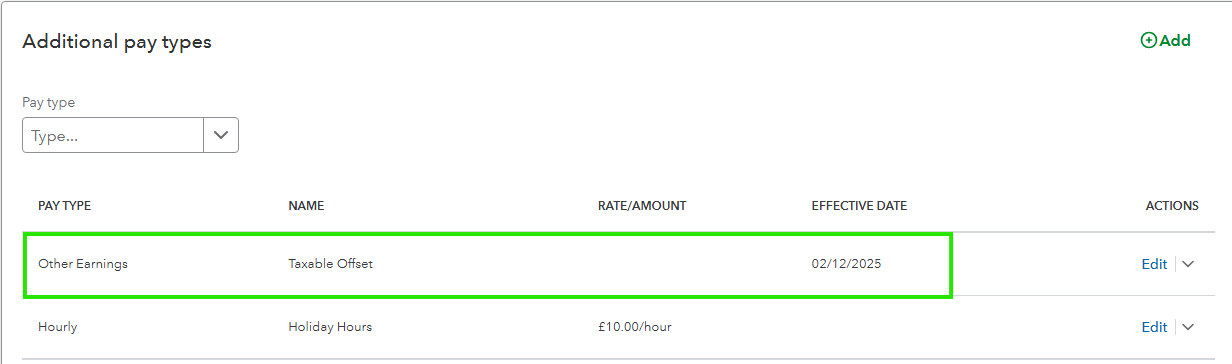
Once done, set up workplace pensions.
After the set up, run payroll.
- Under the Employees page, click Run payroll.
- Select a pay schedule and Continue.
- Zero out the employee's regular pay or salary. Enter 0 for regular hours.
- Select the Taxable offset box, enter the amount. Make sure that the other pay types are 0.
- Adjust the Other earning amount as needed to get the 0.00 net pay amount.
- Once the net pay is zero, click Save.
- Select Preview payroll, then Submit payroll.
- Then Close.
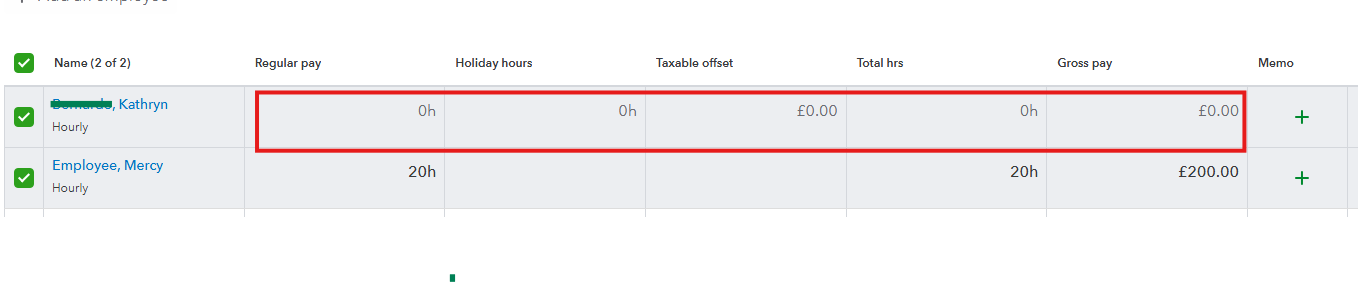
To give you more information on how you can create a zero paycheck, read this article for your reference. Please note that while the article is based on the US version, the process is applicable to the UK version as well: Create a Zero Net Paycheck.
If you have further concerns or any other questions when creating a zero net pay, let us know. The Community team is always right here to assist you.


