Hello, Shayden.
We understand that adjustments to the interface can affect your experience, especially if you have been using a customised setup that matches your preferences.
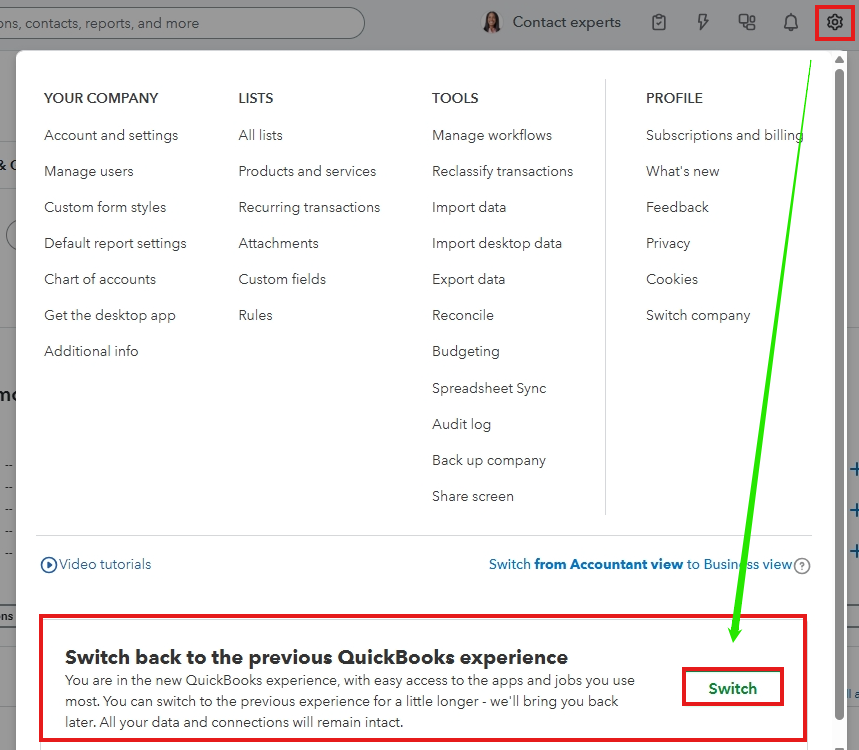
To clarify, are you referring to the new QuickBooks Online interface? If so, here’s how you can switch back to the classic view:
- Click the Gear icon located in the top-right corner of your screen.
- Scroll to the bottom of the menu and select the option titled Switch back to the previous QuickBooks setup.
- Click the Switch button to return to the old layout.
If you are referring to the transaction layouts, you can check out this article about the new layout with the new experience: See what’s new with estimates and invoices in QuickBooks.
Let us know if you have additional questions or concerns by leaving a reply below. We'd be glad to provide further help.


