You can't delete customers in QuickBooks Online (QBO), Yetta. But you have the option to set them as inactive.
This action will hide them from the lists on your Customer's page unless configured to be displayed. That said, note that their existing transactions will still be visible for tracking purposes and documented in reports.
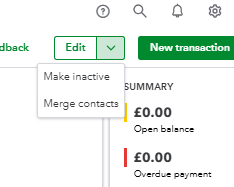
Here’s how to mark them as inactive:
- Log in to your QBO account.
- Go to Customers and goals, then choose Customer.
- Double-click on the customer's name to open their profile.
- Hover over the Edit tab, then click the dropdown ▼ icon.
- Select Make inactive, then choose Yes, make inactive to confirm.
To learn how to inactivate multiple customers at once or reactivate them, visit this article: Delete customers in QuickBooks.
This thread is open if you need further assistance managing your QBO customers. The Community team is here to help you.


