Welcome to the Community, @michaelconroy141.
I can share some information about how you can handle USD payments in QuickBooks Online.
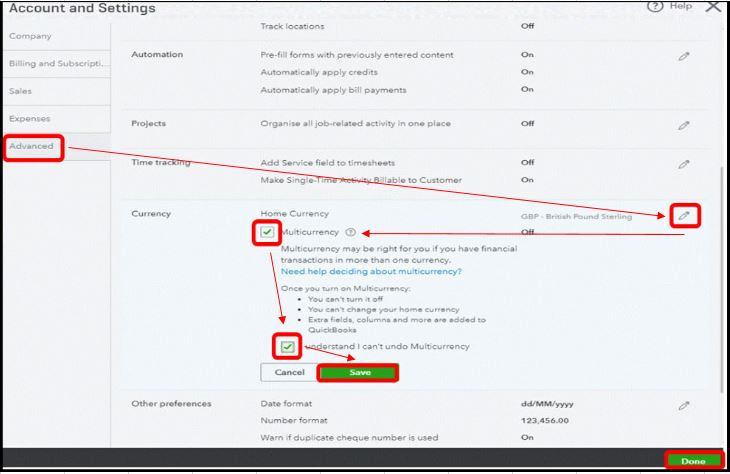
First, you'll need to enable the Multicurrency feature from the settings. You'll need it to handle customer payments in a different currency.
Here's how:
- Click the Gear icon in the upper-right corner.
- Under Your Company, select Account and Settings.
- Go to the Advanced tab.
- Click the edit (pencil) icon on the Currency section.
- Put a check mark on the Multi-currency and I understand that I can't undo Multi-Currency.
- Click Save, then Done.
If your financial institution is connected to bank feeds, you can select the foreign currency option to match the transaction.
Please follow these steps:
- Log in first to your account to access and select the Banking menu to open the Bank and Cards screen.
- From there, choose the appropriate account you’re working.
- Under For Review, locate and select the transaction to open it.
- Mark the radio-button for Find Match.
- Once the Match transactions window opens, choose the Foreign currency radio button.
- In the Select transactions to match section, you’ll see lists of possible matches and select the right one.
- Click on Save.
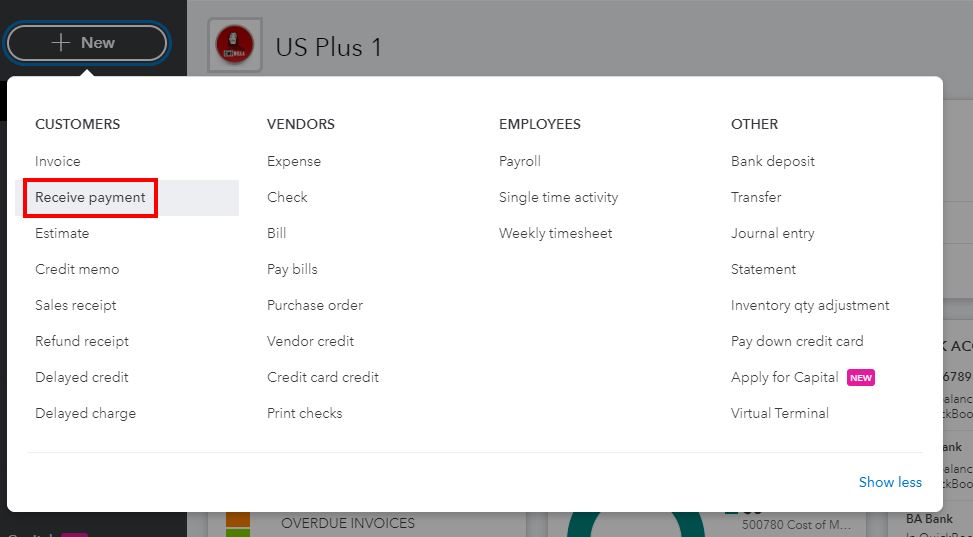
However, there are times that transactions won't match if the difference in the exchange rate amount is more than 10%. If it happens, you can exclude them from your bank and record it manually via the Receive payment option.
If the payment of the invoice is incomplete because of the fee, I suggest you use journal entry. You can credit the Debtors account and debit Bank fees account.
This way, you'll be able to link the created journal entry and invoice through receiving payment. This process will show your sales transaction as fully paid.
Additionally, here are some helpful references that you can check out about Multicurrency, as well as matching transactions for the Banking section:
I'm only a few clicks away if you have any other questions. Wishing you and your business continued success.


