LIMITED TIME OFFER get 90% off for 6 months
cancel
Showing results for 
Search instead for 
Did you mean: 
Announcements
Everything you need to know about connecting your bank and credit cards in QuickBooks Online
info2321
Level 1

I have signed up for quickbooks time as i have been led to believe i can use it as a job scheduling device. How do i set up jobs and then assign at later date

setting up quickbooks time

1 REPLY 1
EduardA
QuickBooks Team

I have signed up for quickbooks time as i have been led to believe i can use it as a job scheduling device. How do i set up jobs and then assign at later date

Welcome to the Community, info2321.


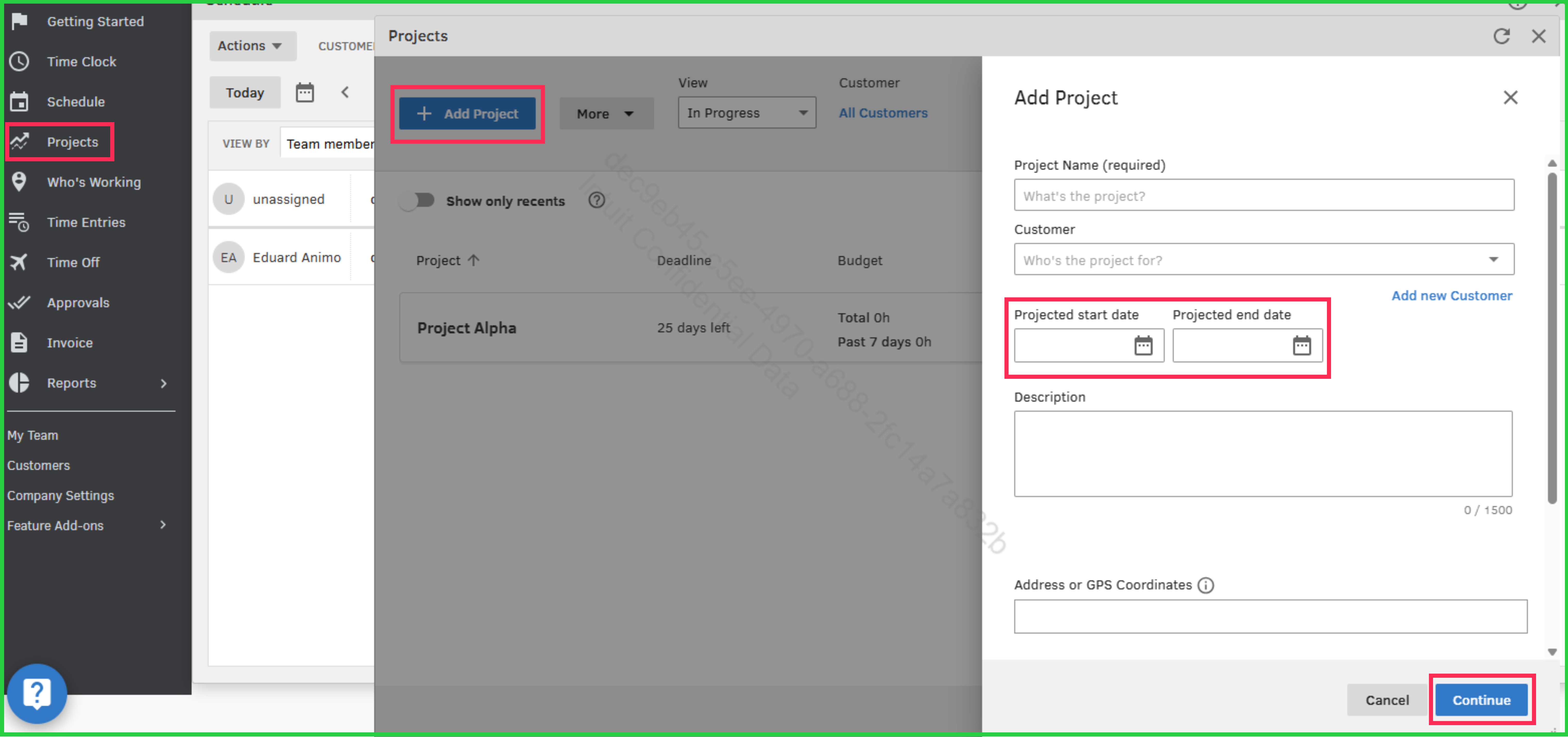
To set up jobs in QuickBooks Time, you'll need to create projects through the Projects section. You also have the flexibility to set start and end dates using the Projected start date and Projected end date.


Here's how:


  1. Go to Projects section.
  2. Select the Add Project option.
  3. Set up the Project Name, Projected start date, Projected end date, and any other details you'd like to include.
  4. Hit Continue when done.


If you're new to QuickBooks Time, check out this resource for extra help: Get started with QuickBooks Time.


Feel free to reach out if you have any other concerns.

Need to get in touch?

Contact us