We can perform some troubleshooting steps to match the data for both the Profit and Loss Detail report and the Standard one in QuickBooks Online (QBO), finance229.
A noticeable discrepancy between the Detail Profit & Loss and the Standard reports may be due to one or more issues, including, but not limited to, the following:
- The date ranges of the reports do not match.
- The Accounting method of the reports does not match.
- If there are any fillers or customisations applied to either report.
- Look at the status of the invoices that are missing from the Standard Profit and Loss report. Sometimes, invoices may be in a draft or pending state and may not count towards the summary totals.
Once done, run both the Profit and Loss reports. Here's how:
- Go to Reports and choose Standard reports.
- In the Find report by name ▼ dropdown, select Profit and Loss and Profit and Loss Detail.
- Select the Report period and set the Accounting method to how you want the income/expense to be reported.
- Tap Customise.
- In the Customise report window, select any additional information you wish to include.
- Press Run report.
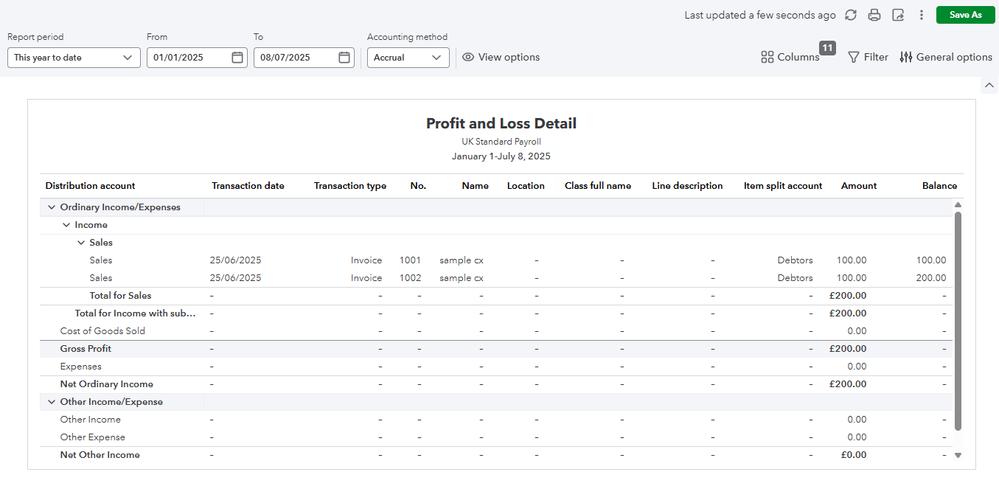

If there are missing transactions that can cause discrepancies between the two reports, you can follow the steps in this article to troubleshoot the issue: Find the missing income and expense transactions in your Profit and Loss report.
If the same thing happens, we can run the Transaction Details by Account report to locate specific transactions and see if they are miscategorized. This can help identify invoices that are not being reflected in the Profit and Loss report. Here's how:
- Go to Reports and choose Standard reports.
- In the Find report by name ▼ dropdown, select Transaction Details by Account.
- Select the Report period and set the Accounting method to how you want the income/expense to be reported.
- Click the Filter icon.
- Choose Transaction type in the first field.
- In the second one, choose equals and select Invoice in the third field.

Visit these articles to learn more about report features and specific reports to get the info you need:
We are always here to help if you need anything else with running your financial reports or QuickBooks-related concerns.


