Hello there, @craigr71. To access the Construction Industry Scheme (CIS) category in your QuickBooks Sole Trader (QBST) account, we'll have to enable the feature first. This way, QuickBooks will automatically add the required accounts to track deductions.
Before we proceed, please know that the CIS feature in QBST is designed for subcontractors. Once enabled, you can't turn it off, but you can choose to stop using it at any time. QuickBooks will preserve your CIS accounts and reports so your records remain intact.
- Navigate to the Gear icon, then Account and settings.
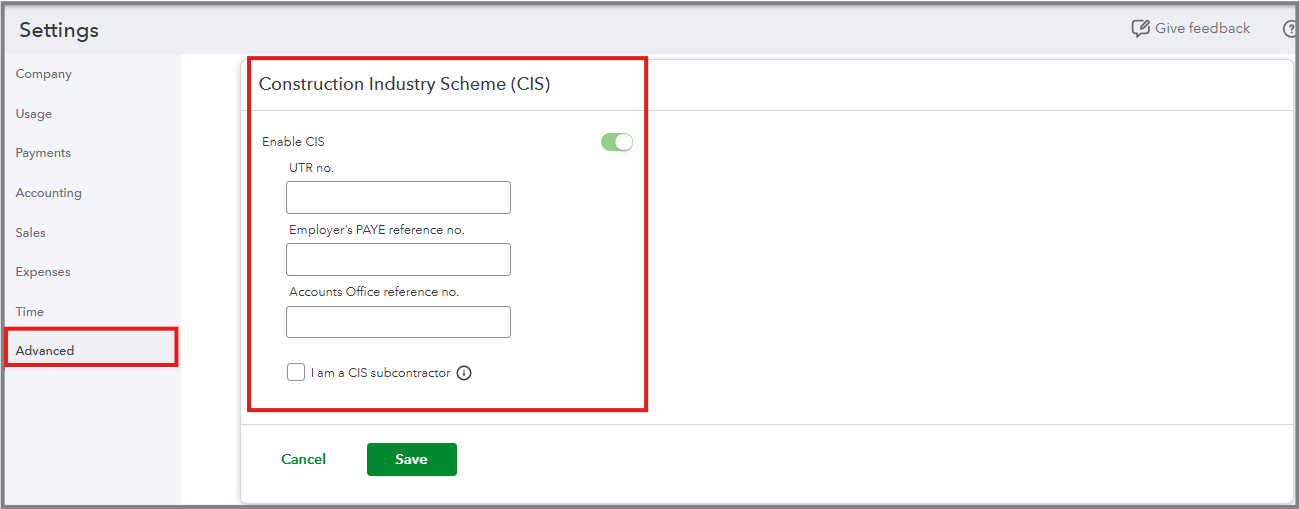
- Go to the Advanced tab and scroll down to the Construction Industry Scheme (CIS) section.
- Switch on the Enable CIS toggle.
- Enter your company's UTR no., Employer’s PAYE reference no., and Accounts Office reference.
- You can also tick the I am a CIS subcontractor box if you operate as one, and select your deduction rate from the dropdown menu.
- Hit Save, then Done.
Next, set up your contractors (as customers) correctly to track CIS accurately. This will help QuickBooks identify them as CIS contractors and ensure proper handling of deductions.
When you create an invoice for a customer marked as a contractor, QuickBooks will automatically calculate the CIS Suffered amount based on your rate and subtract it from the total due.
If you have further questions, please don't hesitate to click the Reply button below. I'm always here to help.


