Hello Trushal, I'll be glad to help you get your payments sorted out today.
To ensure I provide the most direct solution for your goal, are you recording a payment you received from a customer for an invoice or a payment you made to a supplier for a bill?
If you're trying to record a received payment from a customer, here are the steps:
- Click the + New button on the left sidebar.
- Select "Receive payment" under the Customers header.

- Choose your customer's name from the Customer dropdown list.
- Locate the Outstanding Transactions section and click the checkbox for the invoice you are paying.
- Enter the correct date in the Payment date field and confirm the bank in the Deposit to field.

- Click Save and close to record the payment.
However, if you're trying to record a payment you made to a supplier, here's how:
- Select the + New button from the main menu.
- Click on "Pay bills" located under the Suppliers column.
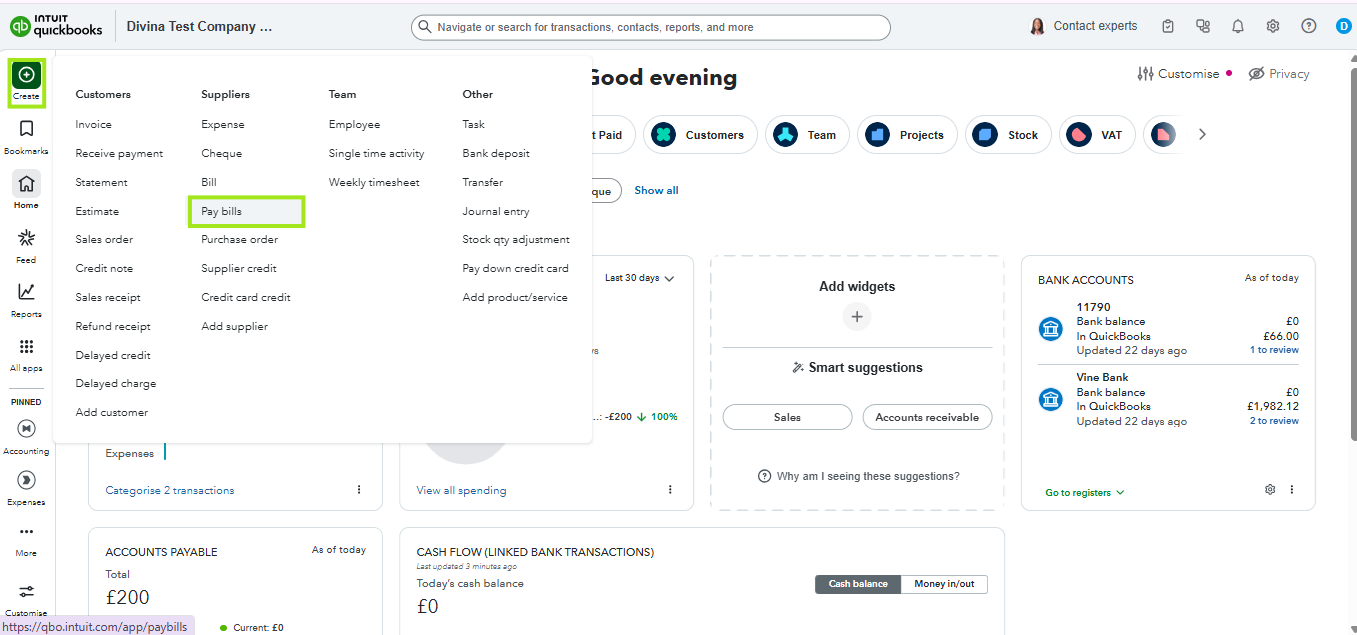
- Choose the specific bank account used for this transaction in the Payment account dropdown.
- Find the bill you paid and click the checkbox next to it in the list.
- Review the amount paid and the Payment date to ensure they match your bank statement.

- Select Save at the bottom of the screen.
Please let us know if you have questions. We're here to help.


