Thank you for reaching out to the Community, theedventureproject. We can go to the Sales transactions directly to update the amount you've mistakenly entered. Please note that If the payment is already linked to a bank deposit, you’ll need to delete the deposit before you can make changes.
To update the incorrect payment amount, here's how:
- Navigate to My Apps and select Sales & Get Paid.
- Go to Sales transactions and locate the customer whose payment you want to modify.
- Select View/Edit next to the customer’s payment record.
- Update the Amount Received field with the correct amount.
- Click Save and close to finalize your changes.
To delete the amount that was already deposited, follow these steps:
- Go to the Receive Payment page.
- Under the Customer section, click on the deposited amount to access the Bank Deposit section.
- Select the More option at the bottom of the page, then click Delete.
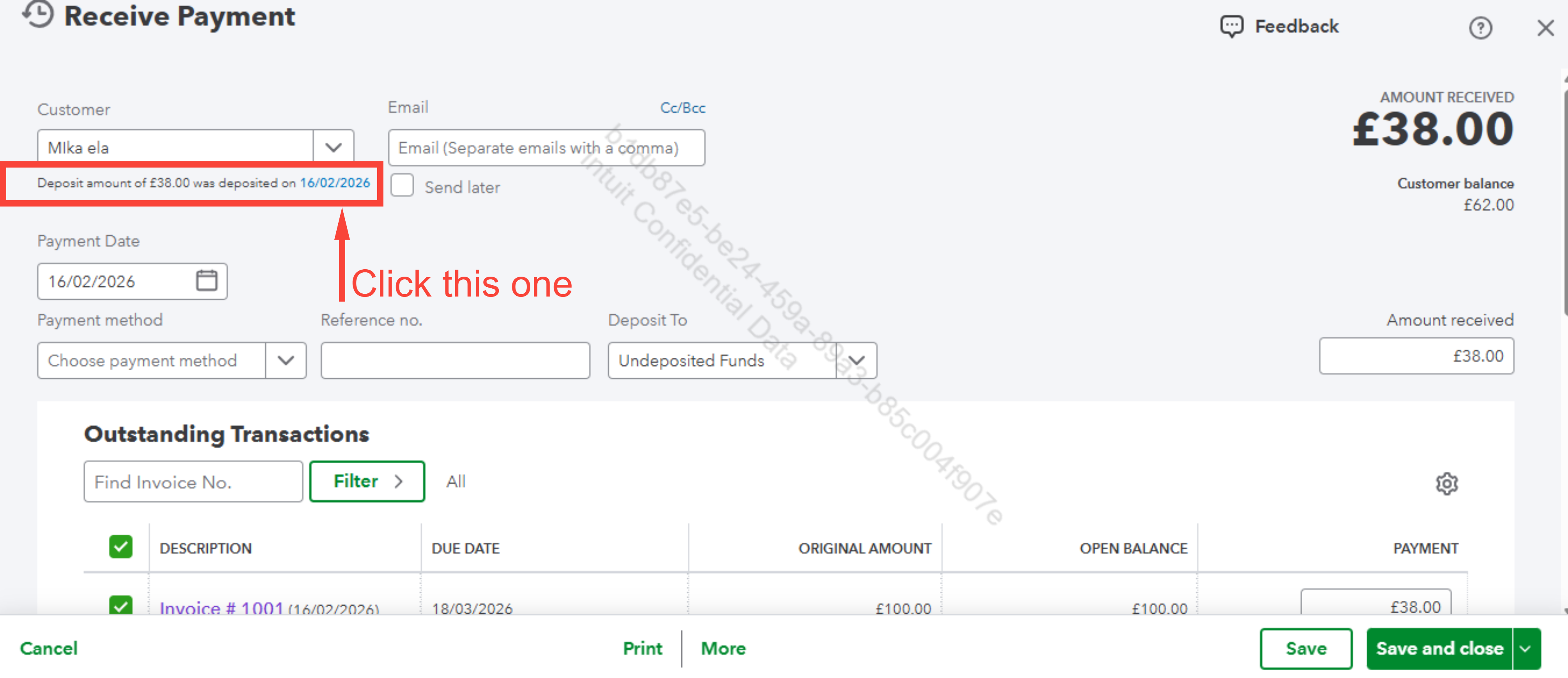
Once the deposit is deleted, you can return to the steps above to edit the payment and re-create the bank deposit if needed.
If you have any further questions or run into issues, feel free to reach out. We’re here to help.


