This issue occurs when the invoice transaction is incorrectly matched to a deposit, Jamie.
To verify, go to your Bank Transactions and review the deposit details intended for the unpaid invoices to see which transaction has been linked to them. Here's how:
- Go to the Transactions menu.
- In the Bank Transactions window, locate the deposits related to the outstanding invoices.
- Click the Pencil icon beside the chain symbol to view details and verify which invoice is linked.
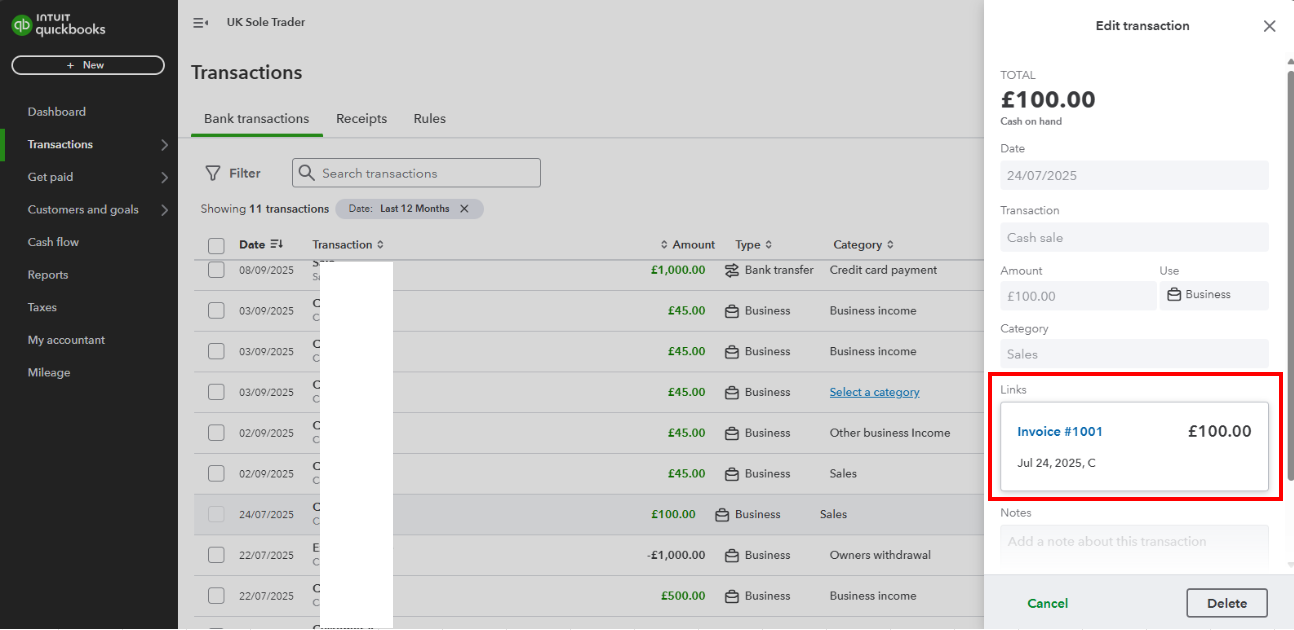
If you see an incorrect transaction linked, click the Delete button to unlink it. Once done, follow these steps:
- Go to Get paid menu and select Invoices.
- Find the transaction and click Record Payment under the Action column.
- Select the appropriate bank account in the Deposit to section and adjust the date filter to match the date the deposit was posted.
- Click Apply.
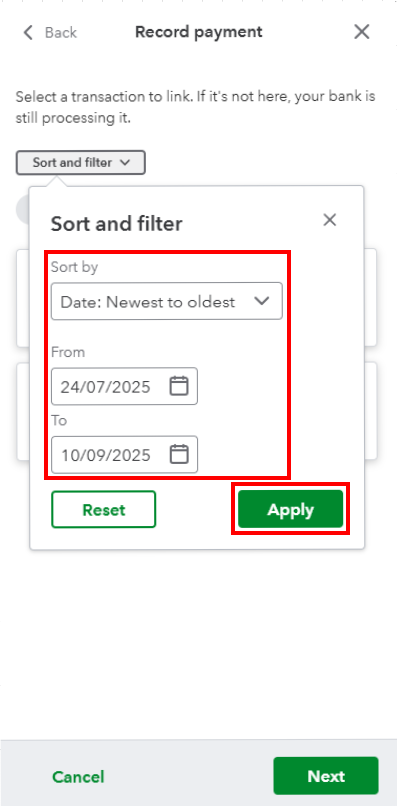
- Check the matching entry and click Next, then Save.
If the payment correctly matches the deposit but the invoice status remains unpaid, I recommend contacting our live support team to check and investigate further.
Stay in touch if you require additional assistance managing your bank entries and sales transactions. The Community always has your back.


