Hi, @Fiona212.
Since this is money received from the TFL scrappage scheme, you can set up an income account in your Chart of Accounts (CoA) specific for tracking this payment.
Note: I highly suggest consulting your accountant for assistance with this, as this process needs their expertise to help you determine the proper categorisation for your financial reporting. If you need to find an accountant, you may visit our Find an accountant or bookkeeper page to locate one near you.
Here's how to create a Chart of Accounts:
- Navigate to the Gear icon, then select Chart of Accounts.

- Click the New button to add a new CoA.

- In the account name, put "TFL Scrappage Scheme Income".
- Choose Income in the "Account type" and Other Primary Income for the "Detail type".
- Click Save.
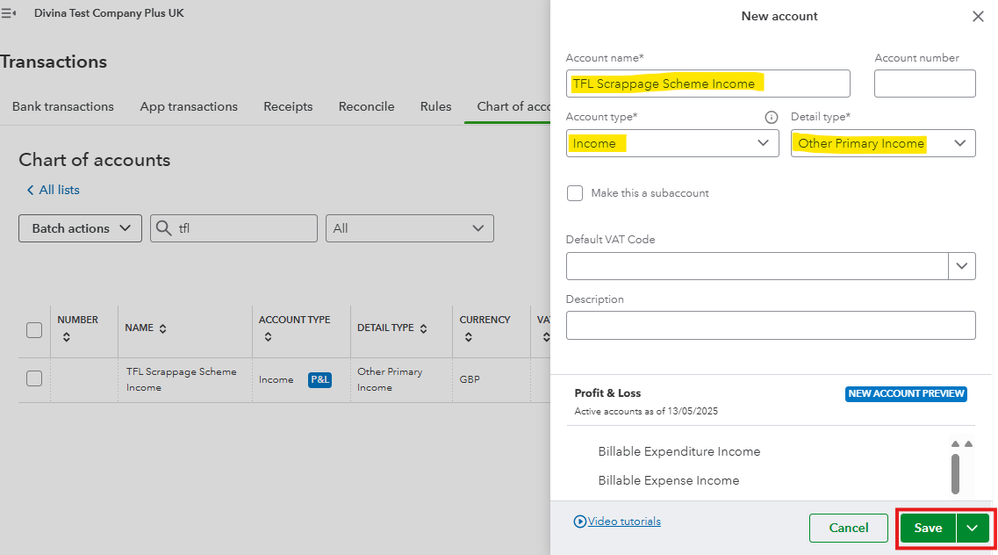
After creating a CoA, let's create a Bank deposit to categorise this amount into the income account you've created.
Here's how:
- Go to the +New button, then click Bank deposit
- In the "Account" drop-down, choose the bank account into which the deposit is made
- In the "Add funds to this deposit" section, choose the payer in the "Received from" column, and under the "Account" column, select the "TFL Scrappage Scheme Income" account you created and fill in other necessary information
- Once done, select Save and Close.
This process records the payment you received from the TFL scrappage scheme in your QuickBooks Online (QBO) account.
Additionally, you can visit this article for your future reference to learn how to reconcile your accounts in QBO: Reconcile an account in QuickBooks Online.
Please continue posting your inquiries here in the Community. I'm here to help if you have more questions about categorising transactions in QuickBooks Online. Wishing you well.


