Hello, Ellie. I am happy to welcome you to the Community space. It's my pleasure to provide you with the process of solving your issue.
I appreciate you sharing with us the details of your transactions. Let us begin to rectify your concern by creating a bill. Here's how:
- Click +New, then hit Bill under SUPPLIERS.
- Choose a supplier. Fill in the necessary fields.
- Put 270 in the AMOUNT field. Select Save.

- After saving, the Make payment option will appear. Select it.

- The Bill Payment window will display. Check the Bill.
- In the AMOUNT field, type 300.
- Tap Save and close.

Next, let's make a Bank deposit to record the 30-amount refund. I'll show you how:
- Hit +New, then choose Bank deposit under OTHER.
- In the Account dropdown menu, select the account where you got the refund.
- In the Add funds to this deposit section, fill in the necessary field.
- Choose Accounts Payable (Creditors) in the Account field, then enter 30 in the Amount section.
- Tap Save and close.

Lastly, let's open the Bill you created from the Expenses menu. Hit View/edit bill to open it. Click the Payment link, then the period. Add the Deposit you made by clicking the checkbox. Tap Save and close. Please see screenshots below for further guidance:

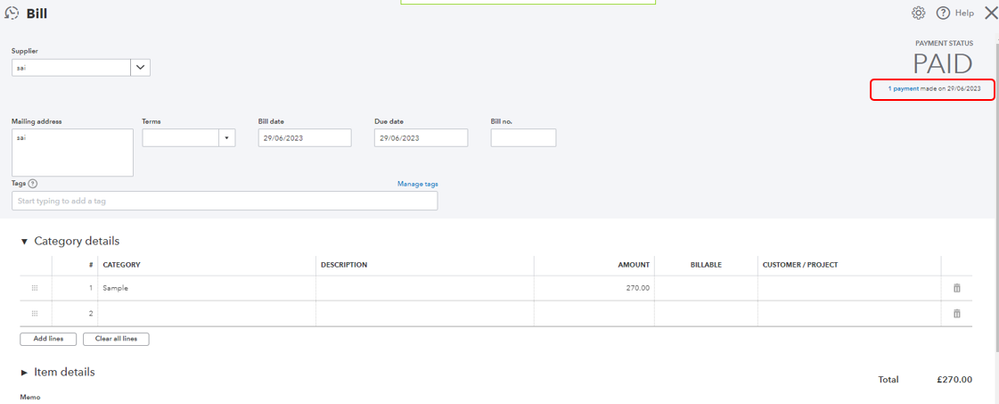


Once everything's done, refund and invoice are now link to the payment.
If you don’t see a payment in the Bank Deposit window moving forward, please refer to this article: Find missing payments you want to deposit in the Bank Deposit window.
The Community is available 24/7. Feel free to reach out to us again if you have further questions. We're always looking forward to assisting you. Take care!


