Turn on suggestions
Auto-suggest helps you quickly narrow down your search results by suggesting possible matches as you type.
Showing results for
Hi, I want to add a paper receipt to my accounts, I am unable to split the receipt (fuel/food) unless it is an unreviewed one. I can’t add it to unreviewed as it’s from outside of accounts.
Can anyone help?
Solved! Go to Solution.
I'll be glad to help you in categorizing your receipts in QuickBooks, @gilesyone-gmail-.
In QuickBooks Self-Employed (QBSE), you can split downloaded banking transactions that aren't categorised yet. You can split them between business and personal, as an amount or percentage.
The option to split receipt that's you've manually entered inside QuickBooks is unavailable. However, you can manually import your transaction in QuickBooks using a CSV file. This way, you can categorise and split it.
Here's how:
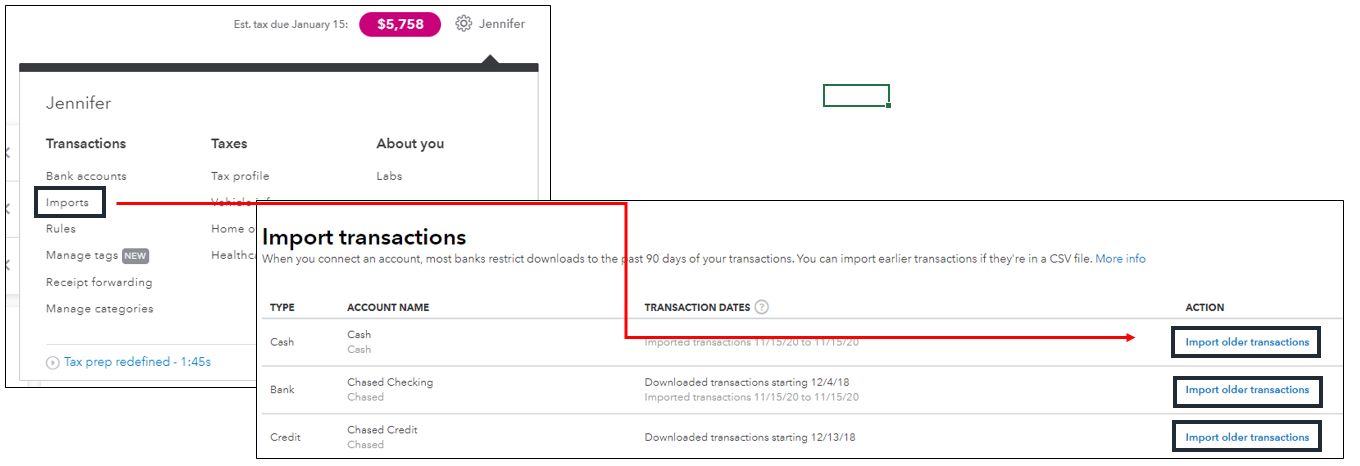
Please take note that before you import your transaction, make sure that the amount you've entered is similar to the amount in your receipt. This way, you can split its amount correctly. Once your transaction is in QuickBooks, you can now attach the receipt and categorise it.
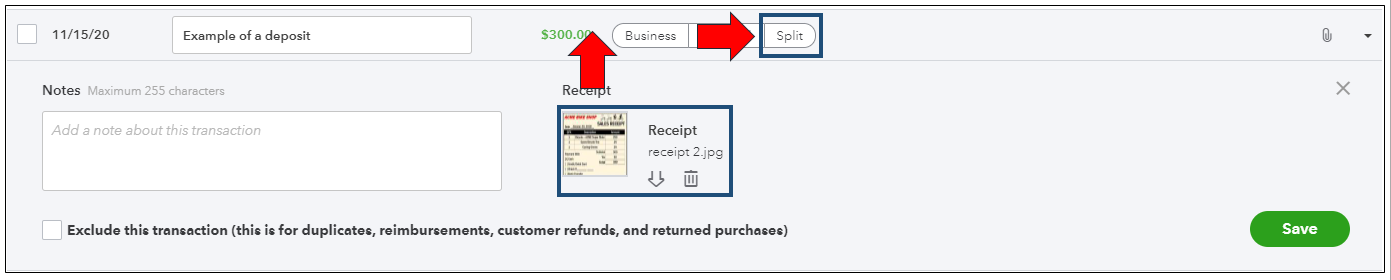
I've also included an article that will guide you in splitting your transactions in QBSE: How to split a single transaction between business and personal, or into multiple categories.
The Community always has your back, so please let me know if you need further assistance. Have a great weekend, and stay safe.
I'll be glad to help you in categorizing your receipts in QuickBooks, @gilesyone-gmail-.
In QuickBooks Self-Employed (QBSE), you can split downloaded banking transactions that aren't categorised yet. You can split them between business and personal, as an amount or percentage.
The option to split receipt that's you've manually entered inside QuickBooks is unavailable. However, you can manually import your transaction in QuickBooks using a CSV file. This way, you can categorise and split it.
Here's how:
Please take note that before you import your transaction, make sure that the amount you've entered is similar to the amount in your receipt. This way, you can split its amount correctly. Once your transaction is in QuickBooks, you can now attach the receipt and categorise it.
I've also included an article that will guide you in splitting your transactions in QBSE: How to split a single transaction between business and personal, or into multiple categories.
The Community always has your back, so please let me know if you need further assistance. Have a great weekend, and stay safe.


You have clicked a link to a site outside of the QuickBooks or ProFile Communities. By clicking "Continue", you will leave the community and be taken to that site instead.


