Turn on suggestions
Auto-suggest helps you quickly narrow down your search results by suggesting possible matches as you type.
Showing results for
In QuickBooks Self-Employed (QBSE), transactions marked as Other Business Expenses appear in the disallowable expenses tax column if they are not deductible according to tax regulations, Sarah.
Disallowable expenses under Other Business Expenses include:
If the transactions you've marked fall into one of the expenses listed above, this would explain why they appear in the disallowable expenses tax column.
For more tips in managing your expenses in QuickBooks Self-Employed, please check this helpful resource: Allowable and disallowable expenses.
Feel free to revisit this thread if you have any other questions. Have a great day!
Thanks - my question wasn't about the difference between allowable and disallowable expenses, as I understand that.
It was why QB would put some expenses I have categorised as OBE, in the disallowable expenses. It won't know what the expense is for? They are all allowable - mainly platform costs that I use for my work.
Thanks for clarifying, @sarah206. You'll have to toggle your connected bank transactions as Business Type.
First, the reason your Other Business Expenses (OBE) transactions are appearing under disallowable expenses in the tax column of SA103F is that they were tagged as Personal type.
To change it to Business type in QBSE, here's how:
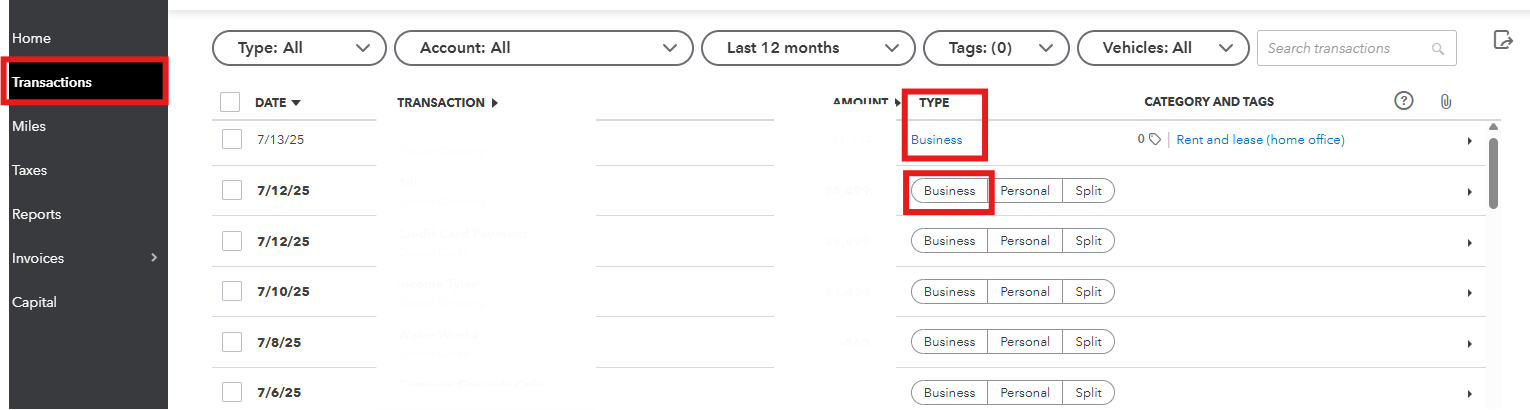
For more detailed information about allowable and disallowable expenses, refer to this resource: Allowable and disallowable expenses.
If you'd like to review and print a summary of all taxes applied to your expenses and invoices, follow these steps:
We're always available to help you out if you have any other questions.


You have clicked a link to a site outside of the QuickBooks or ProFile Communities. By clicking "Continue", you will leave the community and be taken to that site instead.


