Turn on suggestions
Auto-suggest helps you quickly narrow down your search results by suggesting possible matches as you type.
Showing results for
Solved! Go to Solution.
Hello, e-massie-runbox-.
I have a way to help you enter the VAT Road Fuel Scale Charge in QuickBooks.
You can use a journal entry to enter the VAT Road Fuel Scale Charge (click on the + New button, then select Journal entry). You would want to use an account where you track your fuel expenses. Then, add a VAT code for the taxes.
Before doing this, I would recommend consulting an accountant to guide you on what accounts to use. You can also ask them about the VAT codes you want to assign for the taxes.
If you need help with the scale charges calculations, you can check this article from HMRC: VAT road fuel scale charges from 1 May 2021 to 30 April 2022.
Do you need to submit a VAT return after recording your transactions? This article will guide you through the process: QuickBooks VAT return guide.
If you have more questions about recording your taxes in QuickBooks, I'm ready to help you out again. Just reply here and I'll be right there with you.
Hello, e-massie-runbox-.
I have a way to help you enter the VAT Road Fuel Scale Charge in QuickBooks.
You can use a journal entry to enter the VAT Road Fuel Scale Charge (click on the + New button, then select Journal entry). You would want to use an account where you track your fuel expenses. Then, add a VAT code for the taxes.
Before doing this, I would recommend consulting an accountant to guide you on what accounts to use. You can also ask them about the VAT codes you want to assign for the taxes.
If you need help with the scale charges calculations, you can check this article from HMRC: VAT road fuel scale charges from 1 May 2021 to 30 April 2022.
Do you need to submit a VAT return after recording your transactions? This article will guide you through the process: QuickBooks VAT return guide.
If you have more questions about recording your taxes in QuickBooks, I'm ready to help you out again. Just reply here and I'll be right there with you.
When I enter the VAT against VAT Control it doesnt show up on the report in Box 1. This always used to work in the desktop version but the same journal entry is not being picked up in the online version. Any suggestions?
Hi there, Peter.
We understand the importance of making sure VAT entries are correctly shown in Box 1 of your report, especially since this process worked smoothly for you in the desktop version. Switching to the online version might need a few tweaks to ensure transactions are properly aligned with the system’s reporting features.
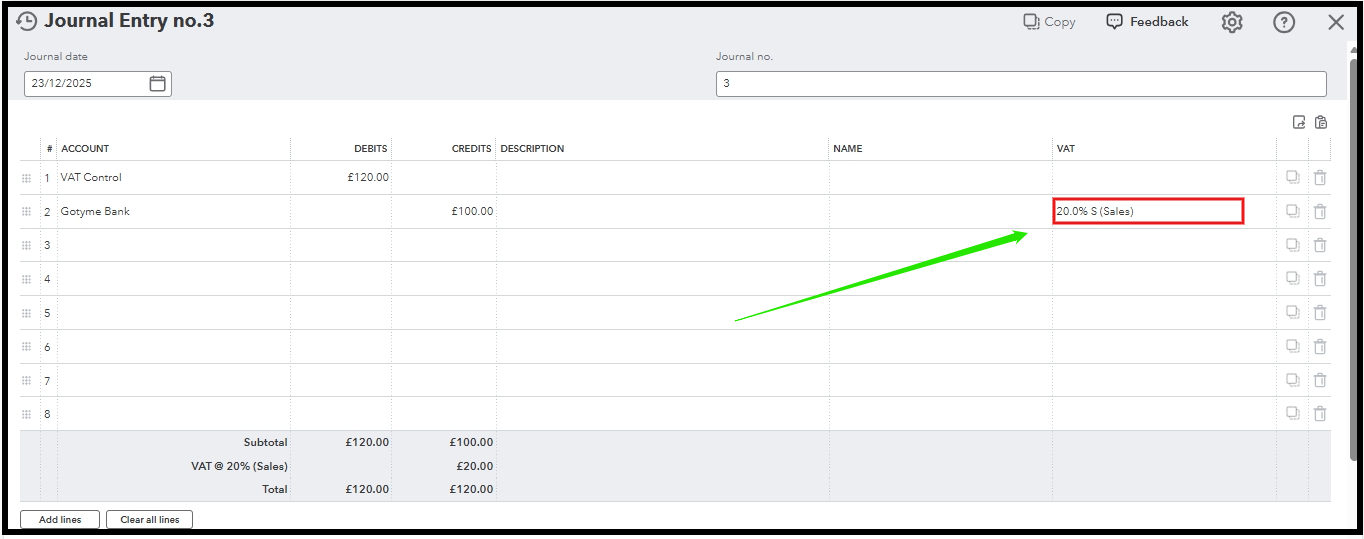
In the online version, it is essential to select the correct VAT code when recording VAT against the VAT Control. This ensures that the VAT is accurately accounted for and reflected in Box 1 of the report, as required.
Box 1 on the VAT return report shows the VAT due on sales and other income, including VAT charged on goods and services you’ve sold or supplied. Using the right VAT codes and amounts is key to properly filling Box 1 with the required data.
To accurately reflect the amount in Box 1, you can adjust the journal entry (JE) and apply the appropriate VAT codes or rates. You may consult with an accountant during this process. They can provide valuable guidance on which accounts to use and ensure the correct VAT codes are applied, helping you stay compliant with tax regulations.
You may refer to this image attached below:
If you have additional questions or concerns, you can leave a comment below. We're here to assist you.


You have clicked a link to a site outside of the QuickBooks or ProFile Communities. By clicking "Continue", you will leave the community and be taken to that site instead.


