Thank you for choosing QuickBooks Online (QBO) to help you manage your business, Jonathan.
At the moment you can enter the transaction using your web browser as QBO app doesn't have the option to enter supplier credits. Here's how you can do it:
- Click the Create menu (+) and select Supplier Credit.
- Enter the vendor name and the credit details for the vendor. Make sure the amounts are positive.
- Click Save and close.

After you've entered the supplier credit, you can use it to offset an open bill as follows:
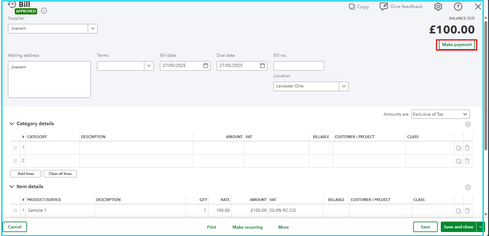
- Open the bill you want to pay.
- Click the Make payment button.
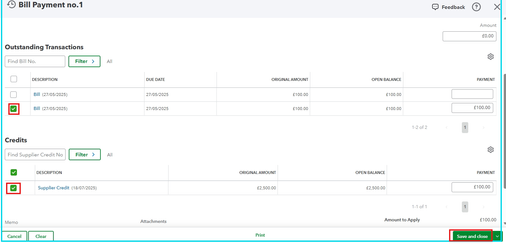
- Mark the bill that you want to pay in the Outstanding Transactions section.
- Go to the Credits section and mark the supplier credit.
- Click Save and close.
If you have additional questions, please leave a reply below. The Community is always here for you.


