Before we proceed, could you please confirm the name of your bank or the specific account you're having issues with? It will help us check for any known problems related to your bank provider.
First, make sure you've selected the correct bank account tile where the transactions should appear. Ensure you're at the right account in the Banking section.
Next, let's check the three areas in the Bank transactions page, which are the For Review, Categorize, and Excluded tabs. Check if some transactions may be categorized differently or unintentionally excluded, which could make them seem missing.
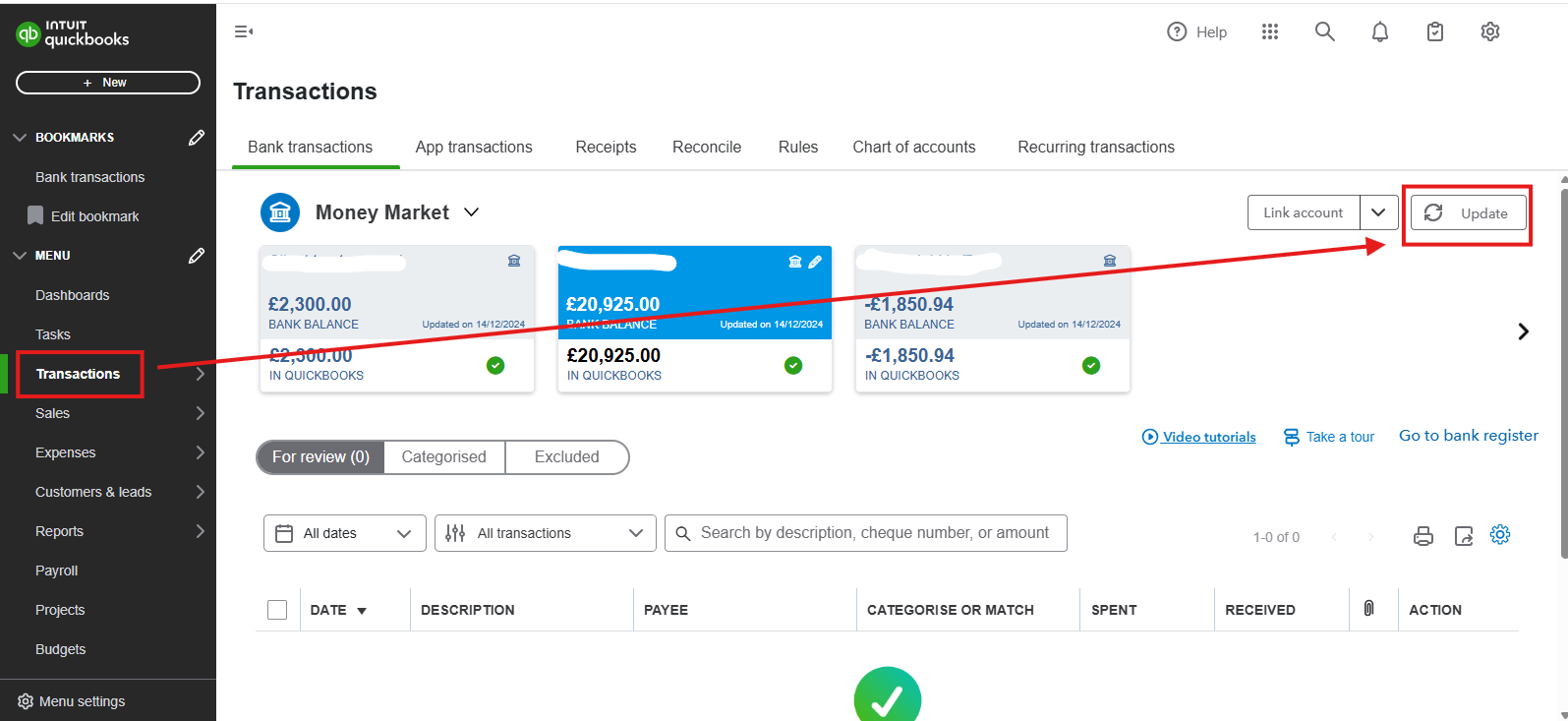
If transactions are still missing, log into your bank's website to check for system maintenance alerts or updates that might prevent transactions from syncing to QuickBooks. If everything looks fine, try using other web browsers and manually update to refresh the connection. Here's how:
- Go to Transactions.
- Select Bank Transactions, then click Update.
If the issue continues after these steps, I recommend contacting our Live Support team to help you find missing transactions for a specific month. Refer to this article on how to reach them: How to get help with QuickBooks.
For now, you can manually upload transactions to ensure your books are up-to-date while troubleshooting sync issues.
Let us know in the comments below if you have any other questions about QuickBooks.


