You've come to the right place, feministcandlecl.
I have a way on how you can sort this out.
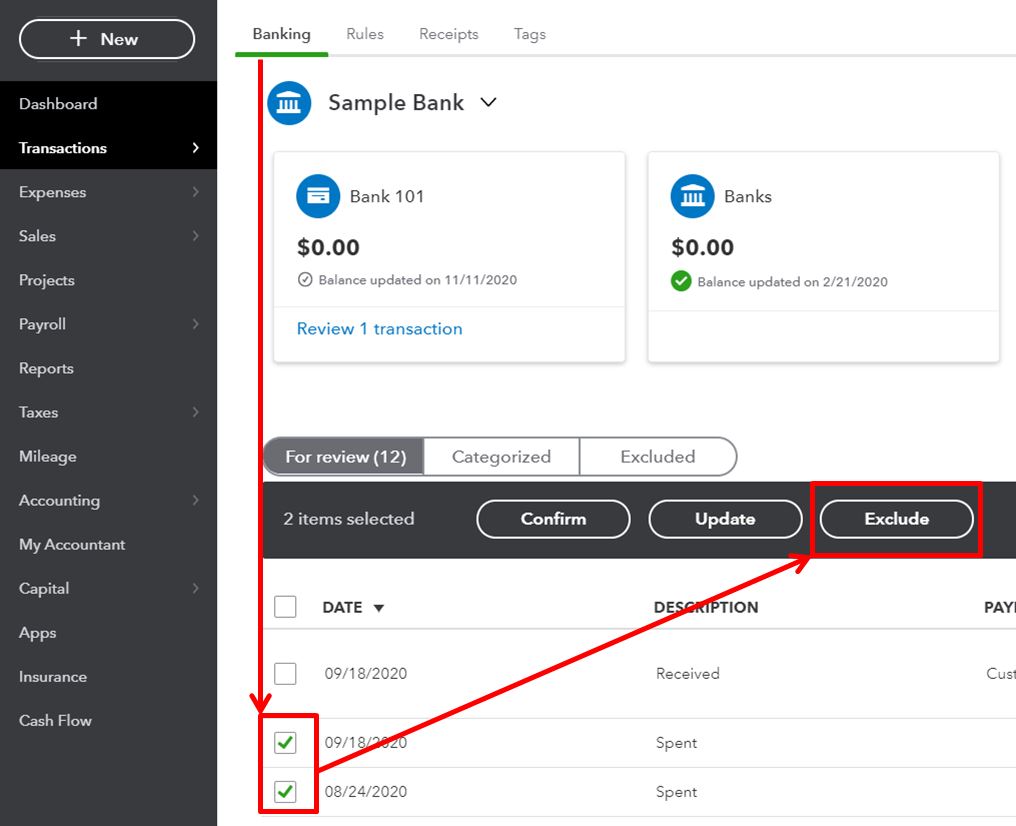
To remove the transactions, you can exclude them by following these steps:
- Go to Banking or Transactions menu, then select the Banking tab.
- In the For review section, put a check mark on the transactions you want to remove.
- Click the Exclude button. Note: You can delete these transactions in the Excluded tab.
Here's a sample screenshot for a visual reference:
Once done, you can manually import the transactions again. Make sure to map the columns to match what was on the CSV file. Here's an article for the step by step instructions: Manually upload transactions into QuickBooks Online.
If you require any further information, please let me know by leaving a reply below. I'll be right here to answer them. Take care and stay safe!


