cancel
Showing results for 
Search instead for 
Did you mean: 
Announcements
Simplify payday and set payroll to run automatically on QuickBooks.Explore QuickBooks Payroll
richard96
Level 5

Employment Allowance changed in Core Payroll

Has the way Employment Allowance is journalled into the ledger changed in Core Payroll?


Previously, when the payroll was run, it posted a rather odd 'Tax Payment' transaction into whatever account the payroll was being paid from, dated the 5th of the next month. This confused clients, as the previous Standard Payroll did this more out of sight. And, if they clicked on Edit to see what this transaction was, they got a confusing error message (and then called me!). But it served a purpose, once we told them to ignore it, and posted the correct adjustment to their payroll liability to reflect Employment Allowance.


Now it looks like nothing is being posted when the payroll is run. Then, on the 6th of the next month, a 'Payroll Refund' transaction is being poosted to a new current asset account called Payroll Refunds? Is that right? That is what seems to have happened today.


Can we have some guidance on this so we can update clients? Payroll/PAYE compliance is one thing that makes the average client very nervous. Or have I missed an update?

1 REPLY 1
Ethel_A
QuickBooks Team

Employment Allowance changed in Core Payroll

Hello there, @richard96.


There have been no recent updates or changes to the QuickBooks Online Payroll process. When your client migrated from Standard Payroll to Core, the account mapping should have remained consistent and unchanged.


Since your client is experiencing this unusual behavior, I recommend reaching out to our Live Support team for further assistance with their account mapping concerns.


Here's how:


  1. Go to the Help icon located at the top-right of your QuickBooks Online account.
  2. Type in Contact Us.
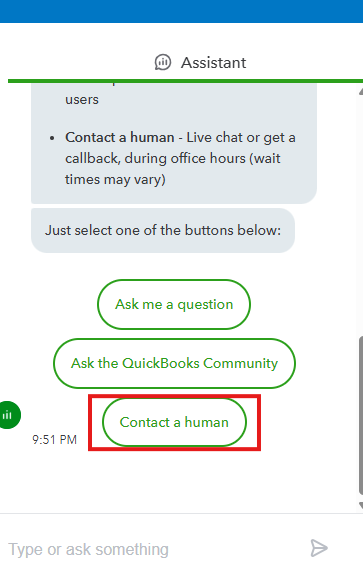
  3. Hit Contact a human.


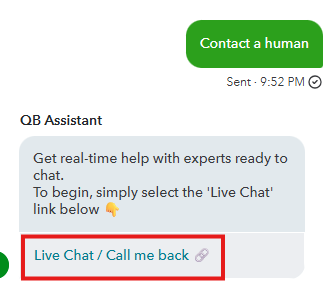
  4. Click the Live Chat / Call me back link.

  5. Enter a keyword of your concern and hit Continue.
  6. Choose to connect through chat or by requesting a callback.


Don't hesitate to click the Reply button below if you have further questions about running payroll.

Need to get in touch?

Contact us