It sounds like you've handled the setup process perfectly in QuickBooks Sole Trader, Lee.
You can set up those vehicles that are no longer in use to inactive instead of deleting them as this option is unavailable. This will also prevent them from appearing in the mileage tracking section to avoid confusion and maintain clarity and efficiency in your records.
I've outlined the steps below to help you through the process:
- Navigate to the Mileage menu and click on the Manage vehicles hyperlink located at the top of the page.
- Browse through the list of vehicles and locate the ones you no longer use.
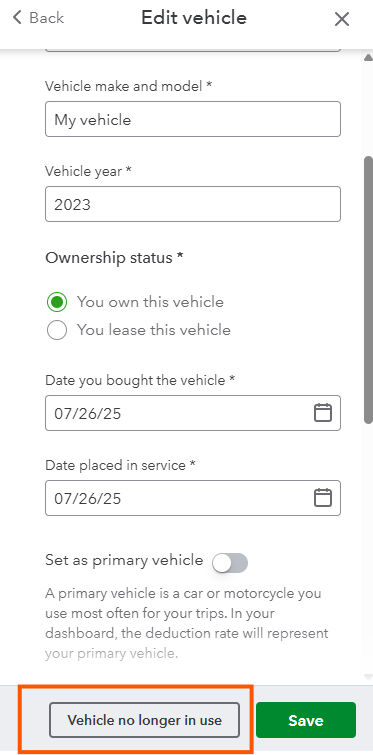
- Select the Vehicle no longer in use option to mark it as inactive.
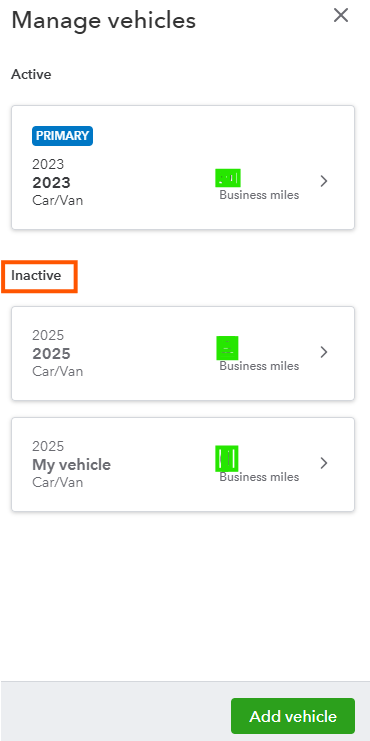
With the details above, only the mileage assigned to the primary vehicle will appear. If you have any other questions, you can always post your reply below. We're here to assist you as always.


