Turn on suggestions
Auto-suggest helps you quickly narrow down your search results by suggesting possible matches as you type.
Showing results for
Hi all,
I know this has come up a few times in the community already, as I've been looking through the threads already to help me, so apologies for still not understanding. I am completely new to accounting.
My situation is this: I am setting up my quickbooks late (6 months into the business) and so am sorting this all out retrospectively. We received a start up loan back in November, which was deposited into owner's current account as the business acct was not open yet. Some initial spending was done from this account. When the business acct opened, we transferred the remaining balance into it. Loan repayments will be from this account.
What I did, following the steps on some other threads, was setup a non current liability acct (notes payable) for the loan, and create a journal entry, crediting the liability acct and debiting the current acct we were paid into. The first issue I came across was that this thread (https://quickbooks.intuit.com/learn-support/en-us/bank-loans/set-up-a-loan-in-quickbooks-online/00/1...) says to enter a negative balance as opening balance for the liability acct. However other threads that seem almost identical (https://quickbooks.intuit.com/learn-support/global/loans/set-up-a-loan-in-quickbooks-online/00/38146...) say just to enter the balance as the full amount, and another user who asked for clarification on this was told to enter the positive balance. So I went back and started again with the journal.
Then I find that journaling the draw down of the loan with a credit to the liability acct and a debit to the current acct means that there is now double the balance in the liability acct!!
So that can't be right, right?
Must it be that the liability acct should start with a negative balance? And do I understand correctly that the liability is then transferred in a way to the current acct by the act of crediting the liabliity and debiting the current?
Is this the correct process to follow if we then transferred the rest of the loan to the business account, and what happens to the liability account going forwards- it seems useless now?
Thanks in advance for any light you can shed on this!!
Solved! Go to Solution.

Welcome to the Community, @JamieD17. You're already on the right track in entering business loans in QuickBooks Online (QBO).
Since the loan you received was not deposited to your business bank account, then you'll have to record a Journal Entry (JE) increasing the equity and liability accounts. This is to show that the money was deposited to a non-business account then having the liability as your payable. The same goes with the purchases/spending made will be through JE as well to reduce the Equity while increasing the Expense Account.
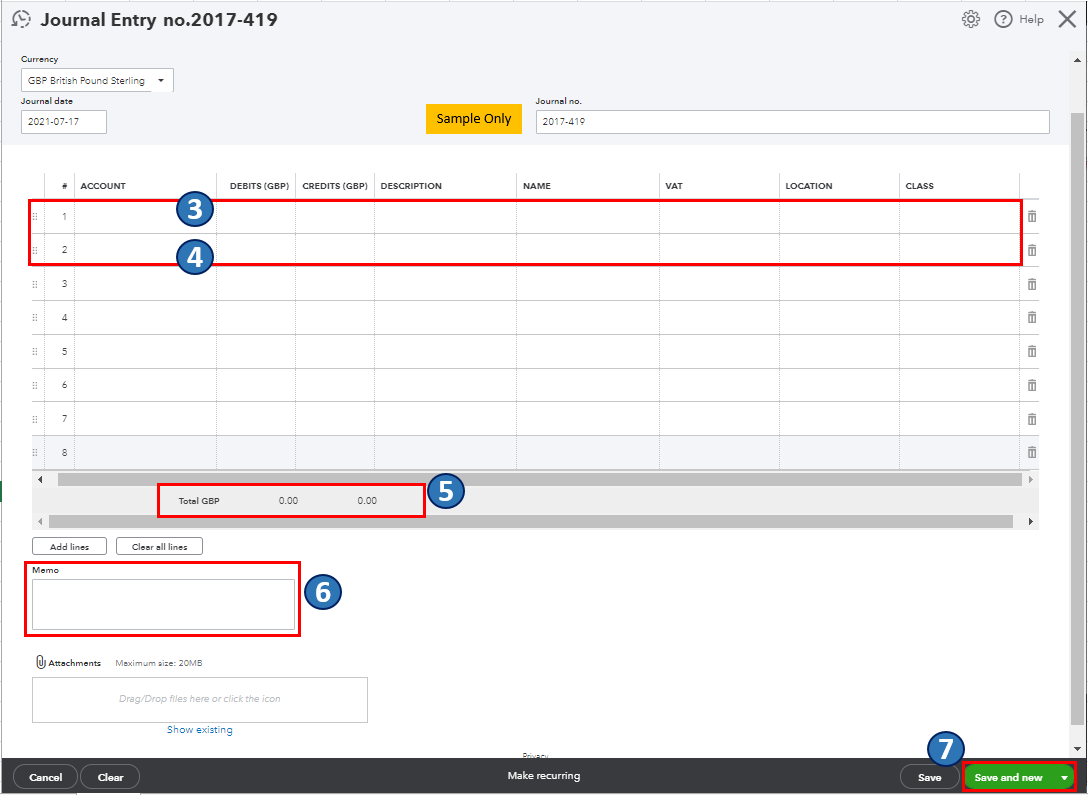
Before creating a JE, make sure both your Equity and Liability accounts have zero in balance. This way, you're able to record the loan accordingly. To create a JE, here's how:
I've attached a screenshot below that shows the last five steps.
After that, follow Step 3 in this article when you're ready to pay back the loan to record each repayment: Set up a loan in QuickBooks Online.
Also, I'd recommend pulling up the Journal report to make sure the debits and credits for each transaction are recorded appropriately. Go to the For my accountant section from the Reports menu's Standard tab. Then, feel free to visit our Help Articles page for more insights about managing expenses, income, and taxes, to name a few.
Let us know if there's anything else that I can help in recording your loan and other transactions in QBO. Take care and stay safe always.
Welcome to the Community, @JamieD17. You're already on the right track in entering business loans in QuickBooks Online (QBO).
Since the loan you received was not deposited to your business bank account, then you'll have to record a Journal Entry (JE) increasing the equity and liability accounts. This is to show that the money was deposited to a non-business account then having the liability as your payable. The same goes with the purchases/spending made will be through JE as well to reduce the Equity while increasing the Expense Account.
Before creating a JE, make sure both your Equity and Liability accounts have zero in balance. This way, you're able to record the loan accordingly. To create a JE, here's how:
I've attached a screenshot below that shows the last five steps.
After that, follow Step 3 in this article when you're ready to pay back the loan to record each repayment: Set up a loan in QuickBooks Online.
Also, I'd recommend pulling up the Journal report to make sure the debits and credits for each transaction are recorded appropriately. Go to the For my accountant section from the Reports menu's Standard tab. Then, feel free to visit our Help Articles page for more insights about managing expenses, income, and taxes, to name a few.
Let us know if there's anything else that I can help in recording your loan and other transactions in QBO. Take care and stay safe always.


You have clicked a link to a site outside of the QuickBooks or ProFile Communities. By clicking "Continue", you will leave the community and be taken to that site instead.


