Hello, Earl13. To separate your income from expense transactions, it’s important to set up accounts for each type: Income and Expense. This will enable you to keep track of your finances accurately and facilitate better reporting.
Here's how:
- Go to the Transactions menu, then select Chart of Accounts.
- Select on New button.
- Fill in the Account Name, Account Number and Detail Type fields.
- In the Account type drop-down menu, select either Income or Expense.
- Once done, hit Save to finalize the creation of the account.
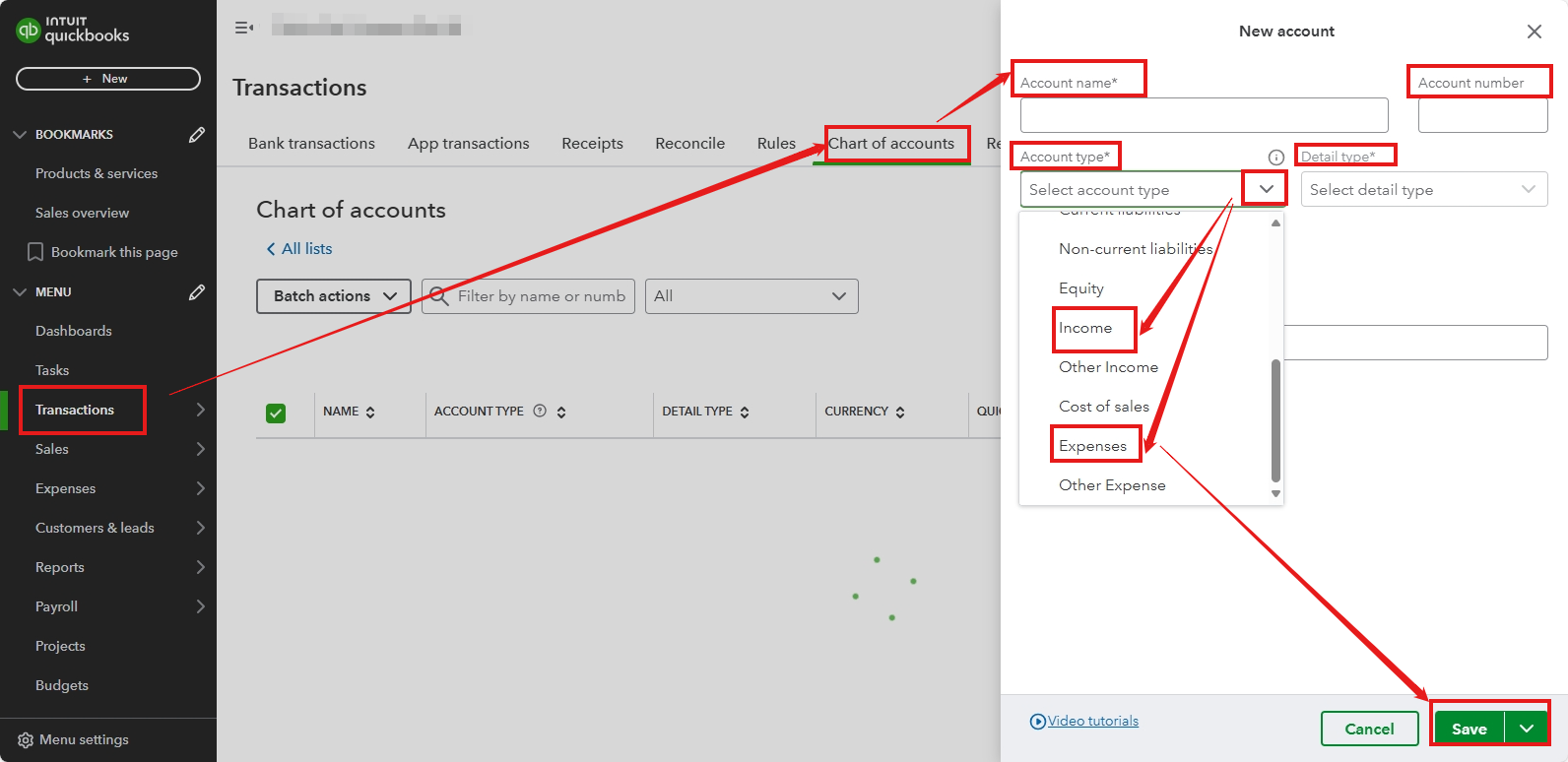
Please repeat these steps for the other account type, selecting either Income or Expense accordingly.
When you start recording transactions, be sure to use the right account to categorise them properly. Doing this will help you keep your financial records organized and make it easier to create accurate reports when necessary.
You can then run your Profit and Loss report to see how much money your business made and spent over a specific period, helping you understand your profitability and make informed financial decisions.
If you have any further questions, please feel free to reply to this message. We're here to help!


