LIMITED TIME OFFER get 90% off for 6 months
cancel
Showing results for 
Search instead for 
Did you mean: 
Announcements
Everything you need to know about connecting your bank and credit cards in QuickBooks Online
Mancrick
Level 2

Today's gripe: Set P&L dates, click on purchases. Click into a bill, exit, and bam—back to P&L view, with wrong dates, and bloated columns again. Char limited to 170!!!

Today's annoyance is the following - can anybody help? I've gone to the P&L report, entered specific dates (1/3/25 - 31/5/25) which is the vat quarter. It brings up the P&L - great. Then, I click on 'purchases' to review the transactions and it defaults to about 10 columns, most of which I don't want to see, so I click on columns, get rid of the bloat, add Dr and Cr, then it looks great. I then click on a specific 'purchase' to take a closer look an the attached bill. I then press the Cross top right when finished examining, and it takes me back to the P&L.... Not back to purchases! A further irritation is that the dates I set in the P&L have now defaulted to a completely different period. So now I have to set the from and to period again, then when I click on 'purchases' again to examine the next one, it brings up the endless columns again. Yes I can right click from the P&L to look at cost lines, but each time, it defaults to giving excessive columns and no dr/cr, so I have to customise every single time. Am I missing something, or is it really this time consuming to use?
2 REPLIES 2
TrixieD
QuickBooks Team

Today's gripe: Set P&L dates, click on purchases. Click into a bill, exit, and bam—back to P&L view, with wrong dates, and bloated columns again. Char limited to 170!!!

We value your feedback on our product, and we're committed to making improvements that streamline your workflow, Manrick.


To easily review specific transactions in your Profit and Loss report, you can use the Open Link in New Tab option.


Here's how:
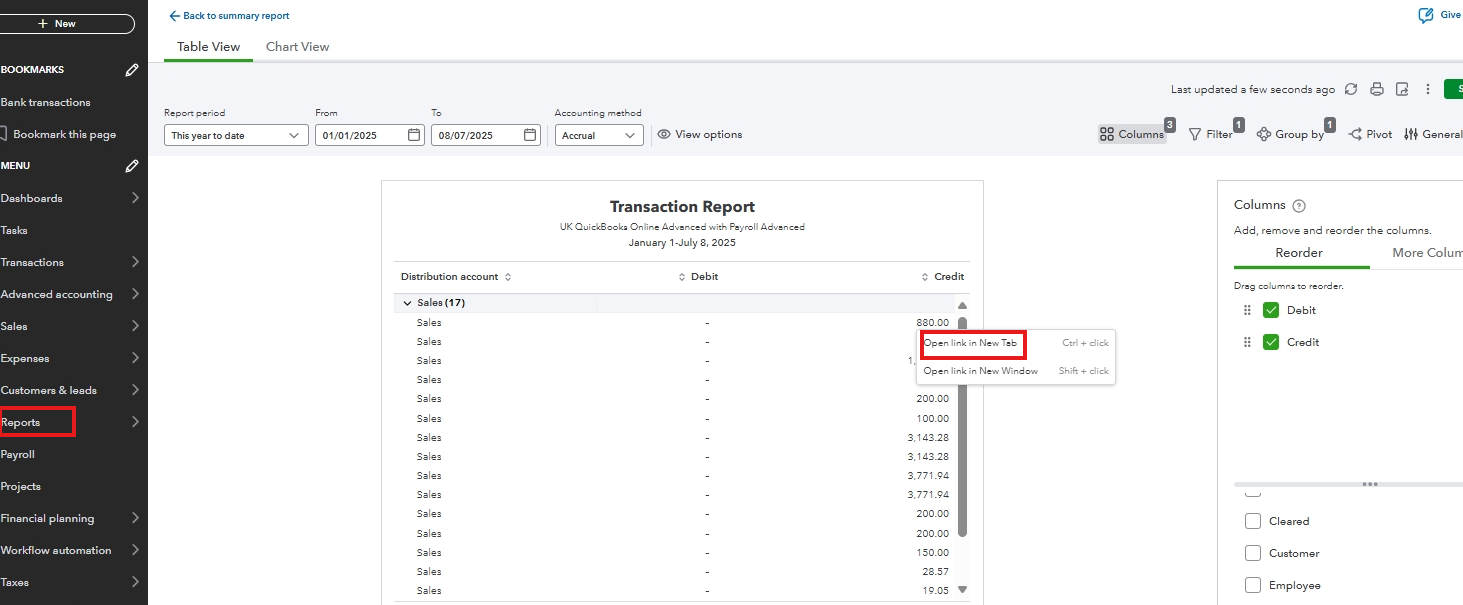
 

  1. Go to the Reports menu and select Standard Reports.
  2. Search for the Profit and Loss report and set the date.
  3. Click on a transaction to open the Transaction Report.
  4. Right-click on the transaction and select Open Link in New Tab.


The report columns are set by default, but we encourage you to share your feedback. Your input matters, and we’re committed to improving our product and enhancing your experience.

  1. Go to the Gear icon, then click Feedback.
  2. Share your comments or product suggestions.
  3. Select Next to submit.


Also, consider checking out this article to save reports and easily share them with other users:
Save a customised report in Quickbooks Online.


For additional questions about QuickBooks, reply here or start a new forum thread. We’re here and ready to help.

Mancrick
Level 2

Today's gripe: Set P&L dates, click on purchases. Click into a bill, exit, and bam—back to P&L view, with wrong dates, and bloated columns again. Char limited to 170!!!

Thanks. Yes, the report columns default setting for every single report wastes so much time, as I have to change the columns every time I click on an account. 

Need to get in touch?

Contact us
