Turn on suggestions
Auto-suggest helps you quickly narrow down your search results by suggesting possible matches as you type.
Showing results for
Hi lesley6,
There is no way to turn off taxes in QuickBooks, however there are some steps you can take so that you are no longer using VAT.
If you have enabled Making Tax Digital in QuickBooks you can disconnect this by going to the Gear icon > Accounts and settings > Advanced > MTD > Learn how to disconnect.
In the Advanced settings > Accounting, change the Default tax rate selection to 'No VAT' to remove the VAT field from transactions when entering.
Your filed returns will remain on the Taxes page for reference, and the open return after de-registering will show but should have 0.00 amount as no transactions will be posting.
Thanks :)
I have Quickbooks premier edition, desktop. I have deregistered for VAT and need to stop QB looking for VAT info. I do not have the 'gear ' icons mentioned in a previous response. Please can you help.
Thanks
Hi KT16,
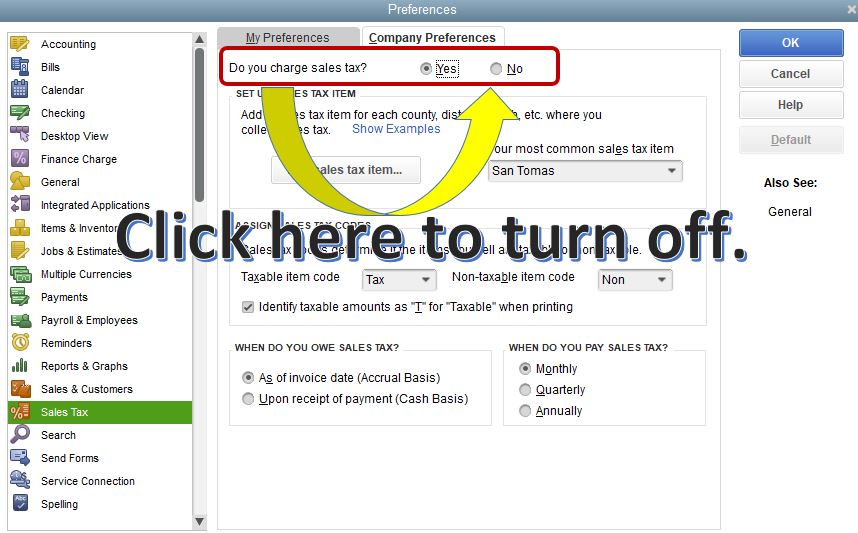
The Gear icon mentioned by my colleague @GeorgiaC is only available in the online version. In the desktop version, you can turn off your sales tax from the preferences. Let me walk you through the steps.
You can refer to this article for more information about sales tax: Set up sales tax in QuickBooks Desktop.
You might also want to visit our page for future help regarding customers: Manage Customers and Income.
Please let us know if you have other concerns.
I de-registered from VAT with HMRC as my company is shutting down. The date of de-registration is mid way through the current vat period. I need to submit my final return but QB just says "Select an end date which is not in the future." How do I get QB to realise the date of the current period has changed? Someone told me it should flow automatically from HMRC but surely I'd need to connect my QB to HMRC somehow to do that?
Hi gruddock
You will have to ensure that HMRC have amended the obligation, end date, of the period they are expected to receive as if they don't you will not be able to submit the return to them. Once they have done this you will have a take action option in the taxes section, when you select this the end date within QuickBooks will update in accordance with what HMRC are expecting.


You have clicked a link to a site outside of the QuickBooks or ProFile Communities. By clicking "Continue", you will leave the community and be taken to that site instead.


