cancel
Showing results for 
Search instead for 
Did you mean: 
Announcements
Need help with the 25/26 payroll year-end?Ask Us Anything
JamesW2
Level 2

Domestic Reverse Charge

In the help article you highlight that the sales invoice should:-


  • Show all the information required on a VAT invoice (for example, VAT Registration Number, the date of service supplied and total amount due).
  • Make a note on the invoice that clearly states the domestic reverse charge applies and that the customer is required to account for the VAT due.
  • Clearly state the exact amount of VAT due under the reverse charge, or the rate of VAT if the VAT amount cannot be shown, but the VAT should not be included in the amount charged to the customer.
  • Invoices for services subject to the reverse charge must include the reference ‘reverse charge’ according to the VAT regulations 1995.


By selecting the correct vat code eg '20.0% RC CIS' does Quickbooks automatically populate the sales invoice with the correct information eg 'state the domestic reverse charge applies' 'clearly state the exact amount of VAT due under the reverse charge' etc etc

1 REPLY 1
jamespaul
Moderator

Domestic Reverse Charge

Hello, JamesW2.


I have some details about what happens when you add the RC CIS code on an invoice. 


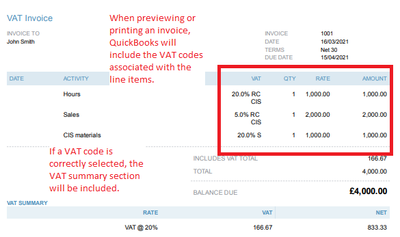
When adding the RC CIS code, QuickBooks will only include the calculation of the VAT codes under the line items section in an invoice. 


Though, a VAT Summary section will be included at the bottom of the page (if a correct code is selected and calculated). 
 

vat1.PNG


To add a more detailed information on where the RC CIS code applies, you can utilise the Message on invoice box


vat2.PNG


If you need a refresher, you can visit this article again: VAT: domestic reverse charge for building and construction service


If you're ready to record bills, purchase orders and other sales transactions, you can check out our guides in the articles list page


I'm open to answer any other questions you might have regarding VAT or any processes in QuickBooks Online. Just reply here and I'll see what I can do for you. 

Need to get in touch?

Contact us
