Hello, JamesW2.
I have some details about what happens when you add the RC CIS code on an invoice.
When adding the RC CIS code, QuickBooks will only include the calculation of the VAT codes under the line items section in an invoice.
Though, a VAT Summary section will be included at the bottom of the page (if a correct code is selected and calculated).
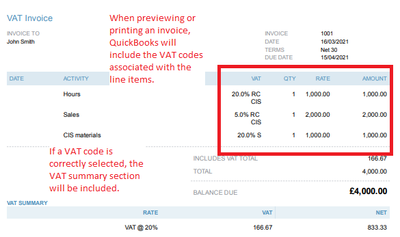
To add a more detailed information on where the RC CIS code applies, you can utilise the Message on invoice box.

If you need a refresher, you can visit this article again: VAT: domestic reverse charge for building and construction service.
If you're ready to record bills, purchase orders and other sales transactions, you can check out our guides in the articles list page.
I'm open to answer any other questions you might have regarding VAT or any processes in QuickBooks Online. Just reply here and I'll see what I can do for you.


