Turn on suggestions
Auto-suggest helps you quickly narrow down your search results by suggesting possible matches as you type.
Showing results for
Is any one else having the following issue.
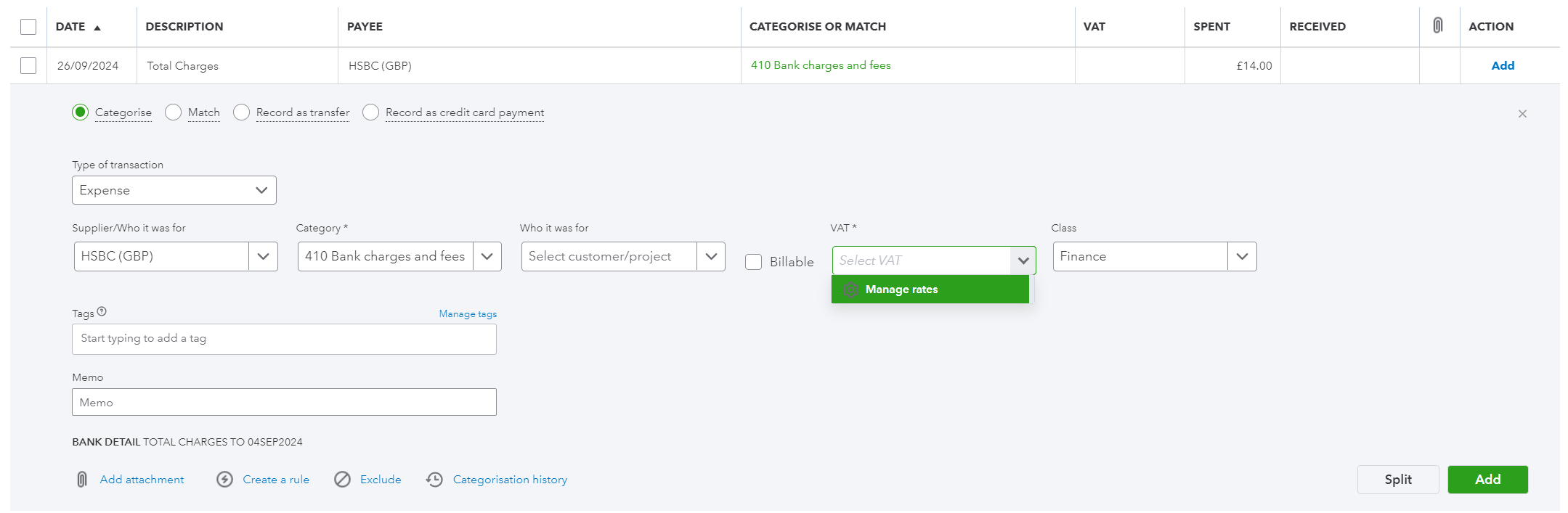
URGENT Fault. In Bank Transactions when you open up a transaction to process, and you select the VAT all you get is Manage VAT. The ability to select VAT is not possible.
Processing in QBO is at a halt due to this bug/issue.
Thanks for adding a screenshot, Michael. I understand how critical it is for you to resolve this matter quickly, and I'm here to help make that happen. Let's work together, so you can add a VAT rate for your bank transactions.
I replicated your concern on my end. I successfully selected the appropriate VAT after the rates appeared. Please see the attached screenshot for visual reference.

In your case, let's perform basic troubleshooting procedures to fix the issue so you can proceed with categorising your bank transactions. An accumulation of historical data can lead to unexpected behaviors.
To begin, open your account and attempt to choose a VAT for your bank transactions, using an incognito window to eliminate the possibility of a webpage issue.
You can do this by using the following keyboard shortcuts:

Return to your regular browser once you can successfully select your preferred rate. Then, clear your cache to start afresh. Alternatively, consider switching to other supported browsers installed on your system.
Moreover, I'm adding these resources on various VAT codes, rates, and guides for effective transaction management:
Please let me know the outcome once you've completed the troubleshooting steps. I'm here to make sure you're taken care of, Michael.
ShyMae
Testing incognito worked. I have then cleared my Cache completely, and the problem has been resolved.
Browser used is Google Chrome on Windows 11.
Thanks for your help.
Michael
You're always welcome, Michael_777.
I'm glad that your concern about adding a VAT rate to your bank transactions was addressed by my colleague above.
Please know that it's always our top priority to respond to your queries promptly to get you back to business seamlessly. You can be confident that we'll remain committed to providing the highest level of support.
In addition, I'm also adding this handy article about the VAT detail report you can run on the basis you have chosen in your VAT settings: VAT Detail Report.
I'm still all ears if you have other concerns with bank transactions. I'd be glad to assist you. Take care always.
Hi, Just wanted to advise that this is still an issue.
We use QBO Online Accountant. If I access the QBO Online client via QBO Accountant I get the same issue and cannot select the VAT from the dropdown.
If however if I log directly into the QBO Online client I do not have an issue.
I have tested this on Microsoft EDGE and Google Chrome and the issue is the same.
Regards Michael
Refer attached document for screen shots.
(PS I am a Bookkeeper in Australia using QBO Online in Australia and the UK and no such issue exists for QBO Online in Australia. I use both MS Edge and Google Chrome using the same browsers)


You have clicked a link to a site outside of the QuickBooks or ProFile Communities. By clicking "Continue", you will leave the community and be taken to that site instead.