Turn on suggestions
Auto-suggest helps you quickly narrow down your search results by suggesting possible matches as you type.
Showing results for
Hello there, mark_otbc & Nichola1.
I understand how important it is to manage your bank transactions seamlessly. Let me provide some updates regarding the maintenance of American Express bank in QuickBooks Online (QBO).
I know how important time is to you and your business. I also consider time to be a vital commodity during workdays. However, the maintenance of the AMEX bank is still ongoing.
As mentioned by my peer above, the expected rectification time is shown on the Connect an Account page when you try to link your account in QBO bank feeds. It shows the project completion of your financial institution's maintenance.

In the meantime, you can manually upload your bank transactions to QBO. You'll want to ask for a .CSV file from your financial institution. Then, upload the file to your account. Here's a detailed article about this process: Manually upload transactions into QuickBooks Online.
Rest assured, the Engineering Team is looking into it and is working to implement a permanent solution that can resolve this issue. While we're unable to give exact dates when this issue will be fixed, I encourage you to contact our Customer Care Team for instant updates on this concern.
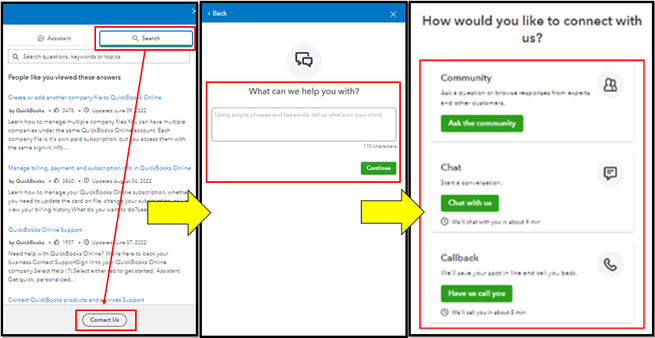
Please check out our support hours to ensure we can address your concerns promptly.
I appreciate your patience while we work to fix this. Please know I'm only a post away if you have other QuickBooks-related questions. Stay safe!

