Turn on suggestions
Auto-suggest helps you quickly narrow down your search results by suggesting possible matches as you type.
Showing results for
I'll share with you the two options on how you can manually add your bank account, @awgphoto.
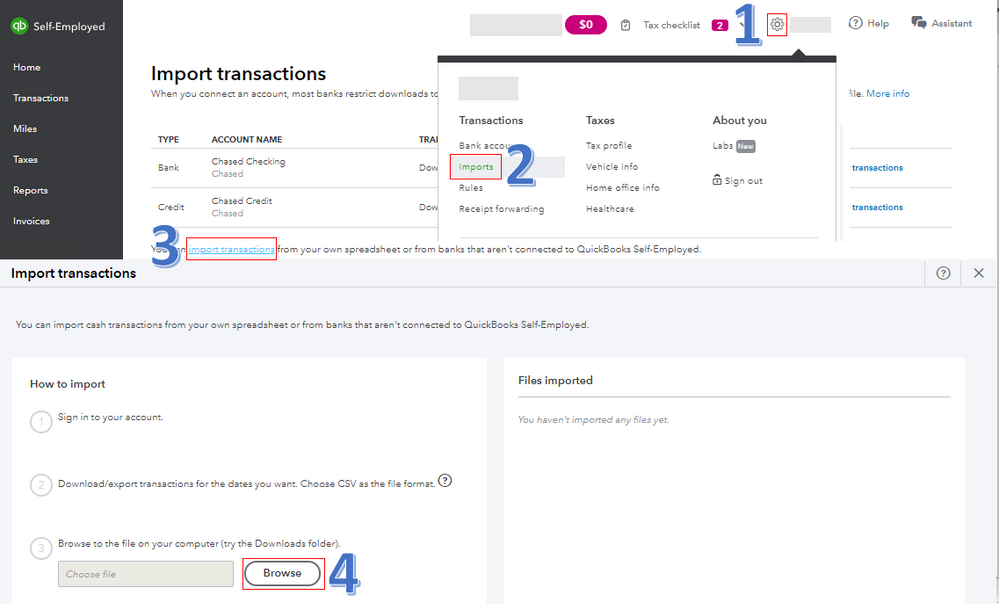
First, you can import bank transactions using a CSV file since your RBS Business credit card has no online access. I'd suggest contacting your bank to verify if they allow you to export transactions to this file type. Once confirmed, the file must be formatted correctly and saved on your computer. Then, start the importing process below.
The screenshot below shows you the first four steps. For detailed instructions, check out this article: Import Transactions From Other Sources.
Once done, the transactions will go into the cash account. With this, you'll need to review and assign them to the correct categories from the Transactions tab. For more information, check out this article: Categorising Bank Transactions.
The second option is to manually add transactions in the program. This lets you enter all of your income and expenses from your RBS Business credit card account. For detailed steps, go through this article: Manually Add Transactions in QuickBooks Self-Employed.
You can always visit this website: Banking Overview. This is a resource hub that contains articles to help you effectively manage your bank transactions in the system.
I'll be around to help if you need further assistance. Have a good day, @awgphoto.