cancel
Showing results for 
Search instead for 
Did you mean: 
Announcements
Accept credit card payments in QuickBooks Online.Explore QuickBooks Payments

Reply to Message

View discussion in a popup

Replying to:
JenoP
Moderator

Reply to Message

You can create a Journal Entry to enter the customer's opening balance, rita-coastcareho. 


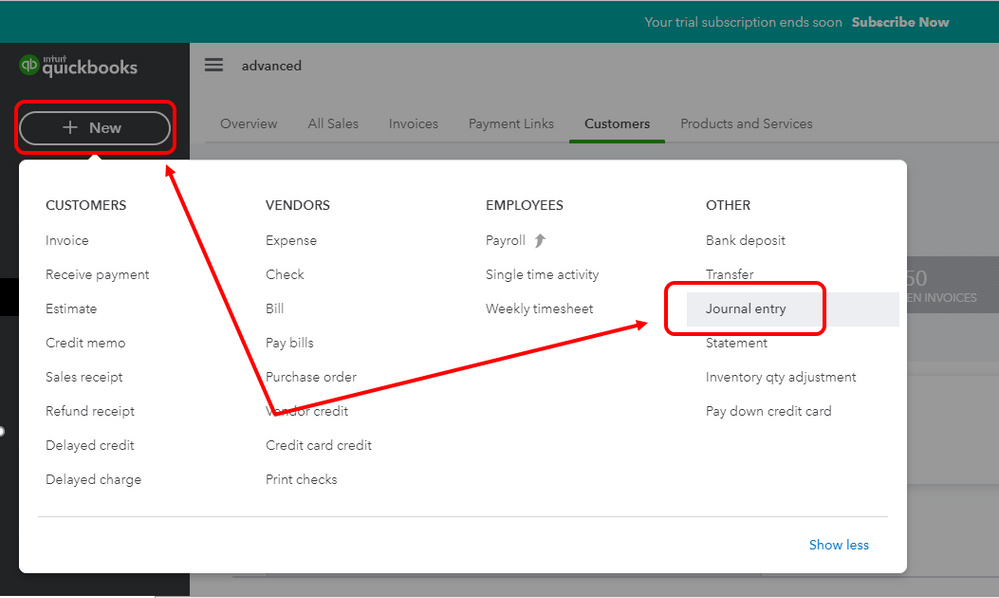
Then, debit the Accounts Receivable account to increase the balance. Here's how:


  1. Click the + New button in the upper-left hand corner and click Journal Entry
  2. Enter the date when you want to retroactively record the opening balance in the Journal date field.
  3. Proceed to the Account column and select Accounts Receivable in the first line.
  4. Enter the amount in the Debits column.
  5. Go to the second and enter the a second account to balance the entry. You'll want to reach out to your accountant if you're unsure which account to use. 
  6. Enter the name of the customer in the Name column.
  7. Click Save and close

Repeat the same steps for the rest of the customers. Let me share this article for more details about this option: What To Do If You Didn't Enter An Opening Balance In QuickBooks Online.


Just in case you have not completed your year-end tasks, you can check out this article for additional guidance and reference: QuickBooks Online Year-end Guide And Checklist.


I'd be glad to jump right back if you have follow-up questions. I'm always here to help. 


journal entry.PNGjournal entry 2.PNG

View solution in original post

Need to get in touch?

Contact us