Turn on suggestions
Auto-suggest helps you quickly narrow down your search results by suggesting possible matches as you type.
Showing results for
You can customize your invoice, info217.
You can add a footer text on your invoice to include your Terms and Conditions. Here's how:
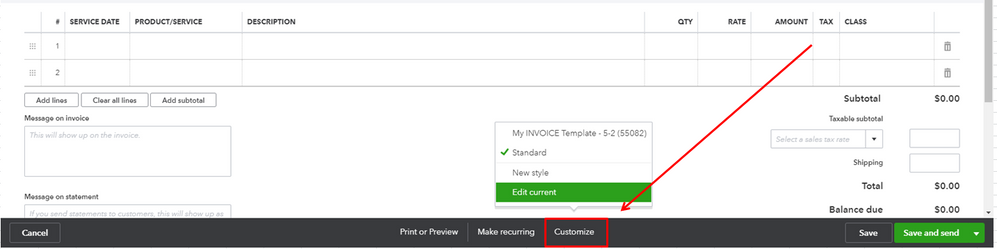
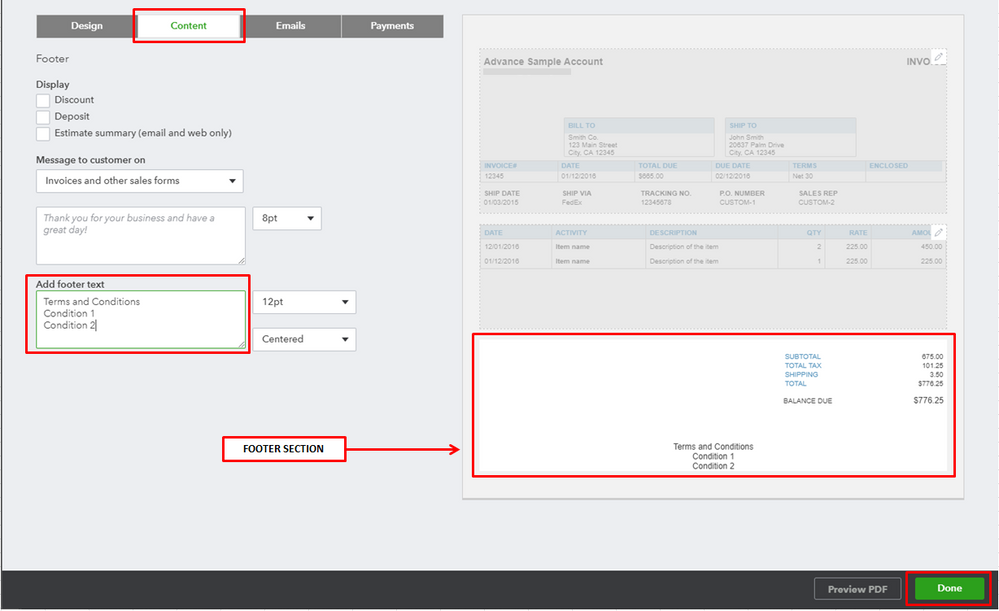
See How to customize invoices, estimates, and sales receipts article as your guide.
If the text you need to add for the T and C's is a long text it would be a case of creating a document you can add in to the attachments section, in the settings cog in the top right of Quickbooks. Then you can upload the document so it will be available going forward, you can use the paperclip icon within the invoice to attach it to any invoice
Please let me know if you have other concerns. Have a great day!

