cancel
Showing results for 
Search instead for 
Did you mean: 
Announcements
Need help with the 25/26 payroll year-end?Ask Us Anything

Reply to Message

View discussion in a popup

Replying to:
Anonymous
Not applicable

Reply to Message

You may want to create an item for the penalty charges, Arzini.


Here’s how:

  1. Go to List at the top. 
  2. Select Item List. 
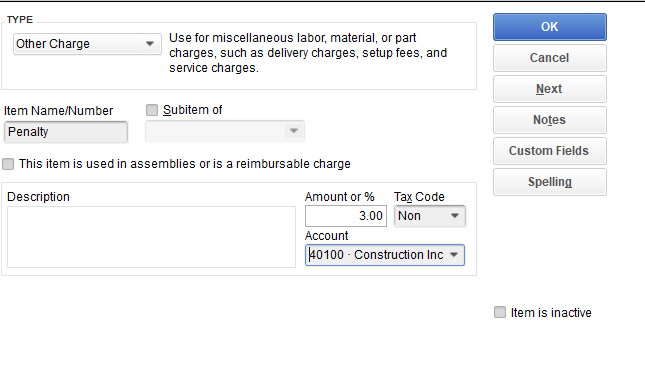
  3. Click the arrow next to Item at the bottom and choose New. 
  4. Select Other Charge for Type. 
  5. Enter your desired item name, percentage amount and account. 
  6. Click Ok.  

1.PNG

Once the customer have overdue, create an invoice for the penalty. 

  1. Go to Customers at the top and select Create Invoice. 
  2. Enter the Item you’ve create for the penalty. 
  3. Enter the 3% penalty amount and the description. 
  4. Click Save and close. 


We have our doors open, so please visit us again if you have other questions.
Need to get in touch?

Contact us