

Fast, simple time tracking helps increase efficiency. Your billable hours are more accurate, and invoicing is a breeze with QuickBooks Time.
We’ve set the bar high for time tracking
QuickBooks Time features lawyers love

Easy invoicing
Record and report every dollar your firm earns by tracking billable time and creating invoices easily.

Seamless integrations
Automate time entry for faster payroll and invoicing. Sync with your favourite payroll and accounting software with QuickBooks Time.

Mobile app
Track jobs, tasks, clients, projects, and more—all from a smartphone.

Audit protection
Get an accurate, paperless audit log that provides a compliant trail for all time entries and timesheet edits.

Manage clients and jobs
Track billable and nonbillable hours for your clients from one intuitive, easy-to-use dashboard.

Job costing
Accurate time data and one-click reports from your web dashboard show you exactly where your hours are going.
Desktop and mobile app tracking
QuickBooks Time is an easy to use, efficient time tracking solution for legal professionals. Whether you’re in the office, working from home or on the go, and whether you prefer Android, iPhone, or a desktop, QuickBooks Time has you covered. Use one feature or use them all—whatever works best for your firm-this software has all the features you’ll need.

How to track time and invoice with QuickBooks Time
Time tracking for clients in the legal field is made simple and easy with QuickBooks Time. Our award-winning customer service and free one to one assisted set-up sessions will get you up and running with the QuickBooks Time customised for your specific requirements in no time.
- Sign up for a free 30-day QuickBooks Time trial—no credit card required.
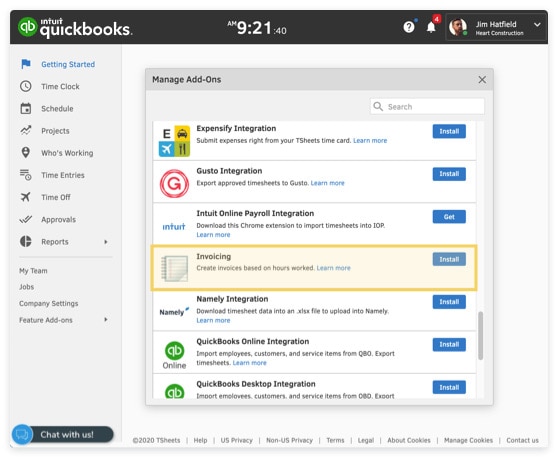
- Go to Feature Add-ons, Manage Add-ons, and install Invoicing.
- Create jobs and select “Billable” and set the hourly rate.
- Open the Time Clock on the web dashboard or mobile app.
- Select a job or task.
- Select Clock In and track time against a client.
- Select Invoices, then choose your client and date range.
- Select Preview Invoice, then Finalise Invoice and Generate PDF.
- Select View Invoice to print or send the invoice.
Why QuickBooks Time tracking is great for lawyers
Managing multiple clients, even on the go, is easy with QuickBooks Time. Track accurate billable hours no matter where you’re working.
FAQs about time tracking for lawyers

Keep growing with Intuit Intelligence
Get started today and automate your path to growth with confidence.


Intuit helps put more money in consumers’ and small businesses’ pockets, saving them time by eliminating work, and ensuring they have confidence in every financial decision they make.
Award Winning Accounting Software


