Turn on suggestions
Auto-suggest helps you quickly narrow down your search results by suggesting possible matches as you type.
Showing results for
I am considering a subscription to QuickBooks Self Employed, but as I run a micro bakery from home, my question is how to manage expenses that are divided between business and personal use? At the moment I can claim 25% of mortgage and utilities etc against tax, but I can’t find an easy way of doing this split on QuickBooks?Any advice would be warmly welcome, other than this query that I can’t seem to find answers to online, it looks like a very user-friendly system!
Solved! Go to Solution.

Thank you for getting back to us and providing us with more details of the concern that you’re having in handling your expenses, @Baked-in-cley.
Yes, you can when entering a transaction or reviewing a transaction imported from the bank/an imported CSV allocate a percentage to personal and percentage to business. If you click on the line of the transaction in the banking section in QuickBooks Self Employed and you will see a split option and with that you can allocate the percentage/amount how you wish and then add the transaction once complete.
I recommend that you consult with an accountant to help you choose the right SA103F categories when claiming allowable expenses for your mortgage and utilities. They are the ones who can advise you on which one is best suited to your transactions.
You can refer to the following article for more information about the SA103F deduction categories you can claim as allowable expenses in QBSE: About SA103F Categories.
See these articles for more information about adding your income and expense transactions in QBSE:
Also, check the following articles to help you get started with QBSE: Help articles.
Please let me know in the Reply area below if you have any further questions on managing your expenses or anything else. I'm always willing to assist. Have a nice day and be safe!
Thank you for considering QuickBooks Self-Employed (QBSE) for your business, Baked-in-cley.
I'm glad to know that you like the looks of the software. Yes, we get feedback that it's simple and easy to use.
We're unable to split QBSE to cater to two businesses, you will need to sign up another one for the other company. However, you want to use a different email address when doing that because we can only have one QBSE account per email.
You can visit the main support page and click More topics to see the references for QBSE.
I'm just around if you need further assistance. Take care!
Hello Jess,
Thank you for getting back to us and providing us with more details of the concern that you’re having in handling your expenses, @Baked-in-cley.
Yes, you can when entering a transaction or reviewing a transaction imported from the bank/an imported CSV allocate a percentage to personal and percentage to business. If you click on the line of the transaction in the banking section in QuickBooks Self Employed and you will see a split option and with that you can allocate the percentage/amount how you wish and then add the transaction once complete.
I recommend that you consult with an accountant to help you choose the right SA103F categories when claiming allowable expenses for your mortgage and utilities. They are the ones who can advise you on which one is best suited to your transactions.
You can refer to the following article for more information about the SA103F deduction categories you can claim as allowable expenses in QBSE: About SA103F Categories.
See these articles for more information about adding your income and expense transactions in QBSE:
Also, check the following articles to help you get started with QBSE: Help articles.
Please let me know in the Reply area below if you have any further questions on managing your expenses or anything else. I'm always willing to assist. Have a nice day and be safe!
How do i use the split transaction feature in Quickbooks Online to do this I can't see a way of excluding the portion of the split that I am not claiming for from expenses?
Thank you for joining the thread, Graham. I'm excited to welcome you to the Community and see your first post here. Just a heads-up: when splitting transactions in QuickBooks Online, the amounts should match the original. Let’s explore other workarounds to adjust your bank entries.
While the option to remove a portion of your splits in a bank transaction is currently unavailable, you can exclude and manually recreate it instead. This way, you can remove the amount that shouldn't be included in the expense.
Here's how to exclude:
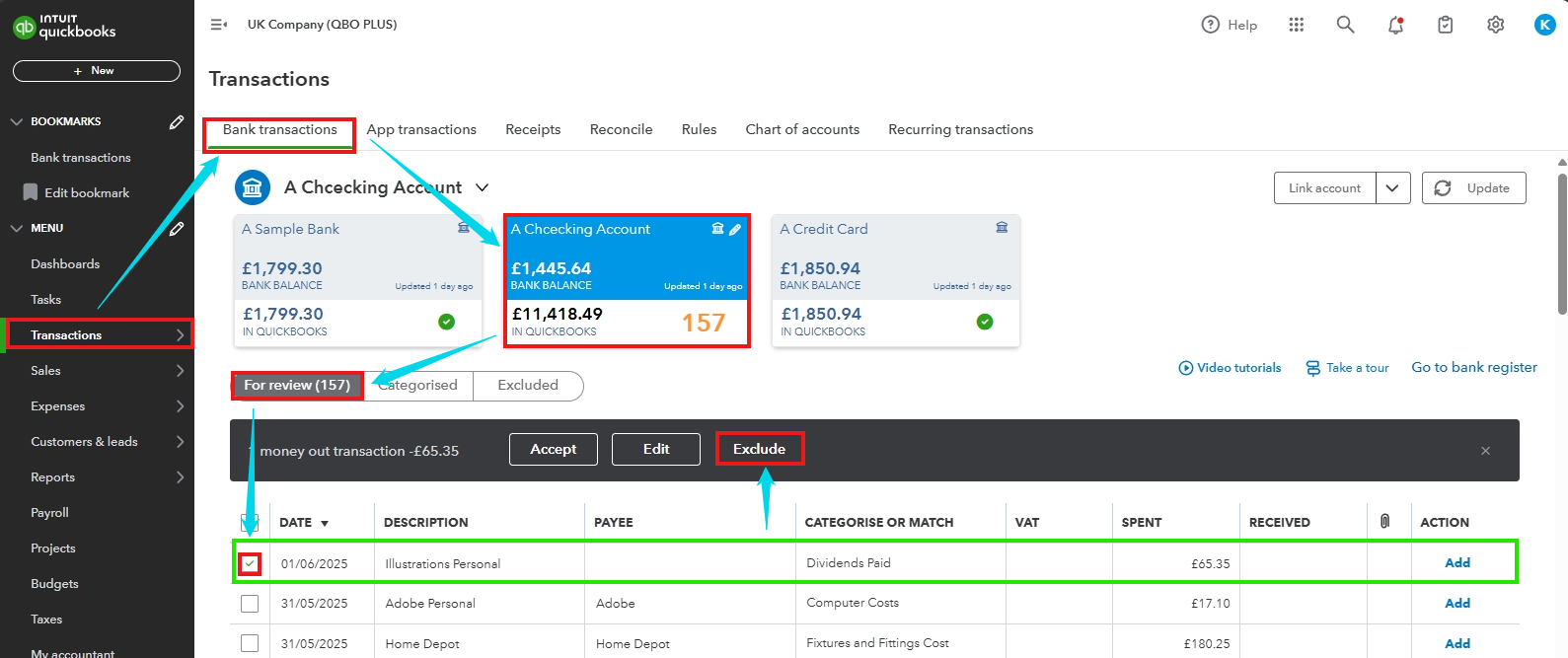
After that, you can refer to this article for the step-by-step process on recreating the entry: Enter and manage expenses in QuickBooks Online.
We're all ears in the Community for questions or clarifications about the split feature and when managing financial activities in QuickBooks Online. Drop us your queries by hitting the Reply button below—we're always glad to help. Have a great rest of your day.


You have clicked a link to a site outside of the QuickBooks or ProFile Communities. By clicking "Continue", you will leave the community and be taken to that site instead.


