Turn on suggestions
Auto-suggest helps you quickly narrow down your search results by suggesting possible matches as you type.
Showing results for
Thanks for sharing the details of your concern, @Hunter501. I'm here to make sure you can avoid getting duplicate transactions while receiving your invoice payments in QuickBooks Online (QBO).
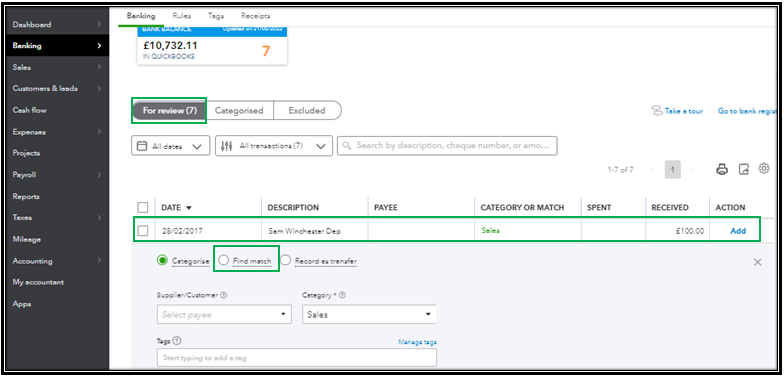
If you have synced your QBO account with the PayPal app, then it may be the reason why it's getting doubled. To fix this, we can omit the duplicate transactions manually. Here's how:
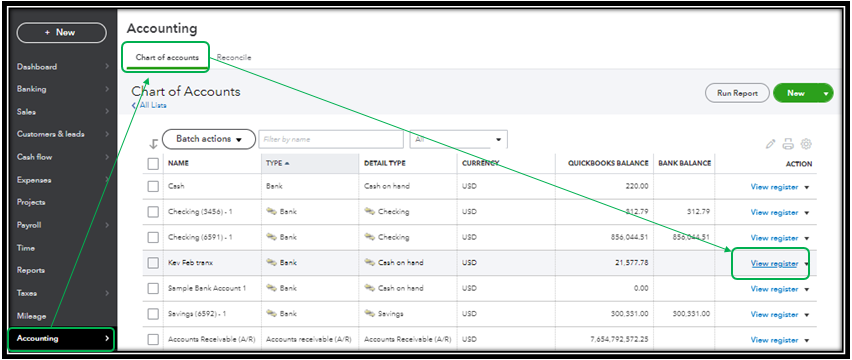
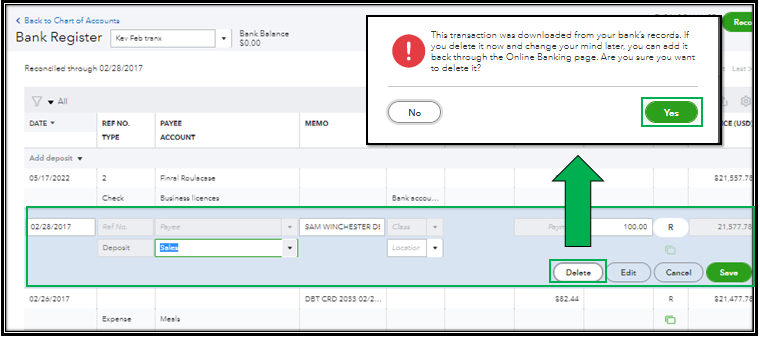
If you have linked your PayPal bank feeds account to QBO, instead of adding the transaction, you'll have to match the downloaded transaction to the posted payment from PayPal.
Additionally, I encourage you to reconcile your accounts every month. This way, you can effectively manage your income and expenses and detect any possible errors accordingly. For the detailed steps, you can refer to this article: Learn the reconcile workflow in QuickBooks.
Let me know if you need further assistance with handling your invoice payments in QBO. I’ll be delighted to assist you. Have a great day ahead!