Turn on suggestions
Auto-suggest helps you quickly narrow down your search results by suggesting possible matches as you type.
Showing results for
I have a way to add these to your invoices, Trudy.
But before we proceed, are you using QuickBooks Online (QBO)? If so, you can create custom fields to add sort codes and account numbers to your invoices. To do so, follow the steps outlined below:
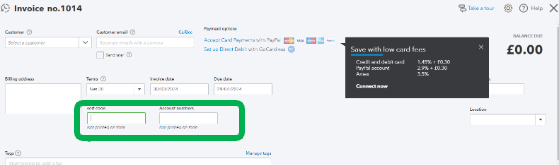
After that, once you create an invoice, you'll be able to see the options. I've added this screenshot for your visual guide:
However, if you're using QuickBooks Desktop, you can go to the Additional Info tab and select Define Fields to create custom name fields.
To know more on how you can manage custom fields in QBO, check out this article for more details: Add Custom Fields To Sales Forms and Purchase Orders in QuickBooks Online.
Furthermore, you can also check these articles if you need more details about customising your forms:
Let me know if you'd like to do something else with your transaction format. We'll always be right here to help you anytime.

