SALE

Get 70% off QuickBooks for 6 months

See plans and pricing
QuickBooks Blog
Need help choosing a plan?
Created with Sketch. 1800 917 771 Schedule a call
Need help?
We're here for you.
Schedule call
Created with Sketch.
A person sitting on a couch with a laptop.
Accounting and bookkeeping

How to Choose the Best Home Accounting Software

Managing your personal finances can feel overwhelming, especially when your expenses, savings goals, and everyday spending are scattered across different apps and accounts.

That’s where home accounting software can make a real difference. It brings everything together so you can make informed decisions about your household budget, from managing cash flow to staying on top of tax time.

Here, we’ll unpack everything you need to know about choosing the best home accounting software for your needs.


Key Takeaways:

  • Home accounting software helps you track income and budgets in one secure location.

  • Key features include automated expense tracking, receipt capture, and tax preparation tools.

  • The best home accounting software combines ease of use with powerful financial reporting.

  • Cloud-based solutions offer flexibility and accessibility from any device.

  • Intuit QuickBooks is the leading home accounting software choice for Australian households and home-based businesses.

  • Free trials allow you to test features before committing to a subscription.


What is home accounting software?

Home accounting software is a digital tool that helps you manage your personal finances in one place. Unlike manually updating spreadsheets, home accounting software automates much of the process by integrating your accounts and giving you real-time snapshots of your financial position.

Similar to accounting software for small businesses, home accounting software is ideal for anyone looking to better control their personal money matters—whether that’s managing household expenses, planning for future goals, or simply feeling more confident about daily financial decisions.

What does home accounting software do?

Home accounting software automates the everyday tasks that typically consume hours of your time. Rather than manually entering transactions, matching receipts to expenses, or reconciling bank statements, the software handles these processes automatically. This means fewer data entry errors, better organisation, and more time to focus on what matters—whether that's managing your spending or planning for the future.

Home accounting software helps you to:

  • Track income and expenses automatically
  • Capture receipts, then organise and store them
  • Generate simple reports to understand spending patterns
  • Centralise financial information across accounts and devices
  • Stay ready for tax deductions and returns
  • Monitor and improve cash flow
  • Set and track budgets or savings goals

Key features of home accounting software

When comparing different types of accounting software for home use, it’s helpful to consider the features that make daily financial management easier. While platforms offer a variety of tools, the best home accounting software includes the following features:

  • Income and expense tracking: Once you've connected your bank accounts, credit cards, and payment methods, your software automatically imports and categorises your transactions. Modern home accounting software learns your spending patterns, making categorisation smarter over time. This means you always know where your money is going—whether it's groceries, utilities, or business supplies.
  • Receipt capture and organisation: With receipt capture functionality, you can photograph receipts on the go, and the software automatically matches them to your expenses. Receipts can also be instantly classified into tax categories, making tax time significantly less stressful.
  • Bank balance management: Real-time bank feeds show you your current bank balance and help you avoid overspending. The software reconciles your records with your bank statements automatically, catching discrepancies before they become problems.
  • Tax preparation tools: Home accounting software automatically organises your income and expenses into tax categories. You'll receive reminders of quarterly tax deadlines, estimate quarterly tax liability, and have all documentation ready when tax time arrives.
  • Budget planning and forecasting: Set up household budgets for groceries, utilities, rent, and savings goals. Compare your actual spending against budgeted amounts to identify where you can cut costs or where you're exceeding your targets.
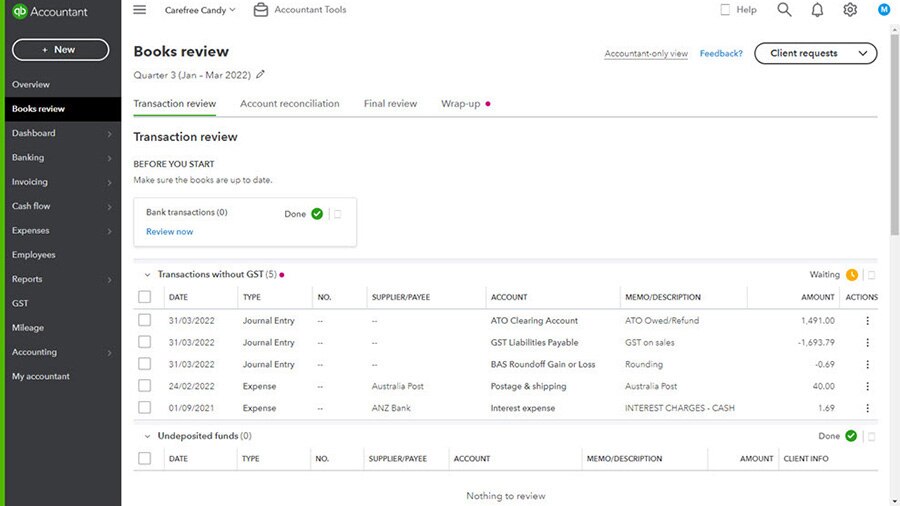
  • Financial reporting: Generate profit and loss statements, expense reports, and balance sheets that give you insights into your financial health. These customised reports help you make informed decisions about your finances.
  • Invoicing and payment processing: If you're running a business from home, create professional invoices within minutes, accept card and bank transfers, and track payment status automatically. The software can send payment reminders and match received payments to invoices.
  • Team collaboration: Grant family members or accountants access to specific areas of your financial data. Assign tasks and manage permissions to keep everyone on the same page without compromising security.

How to choose the best home accounting software

Choosing the right tool depends on your personal needs and financial goals. Take time to evaluate your options carefully—a small investment upfront for the right solution pays dividends through saved time and better financial management.

1) Assess what you’ll use the software for

Think about what you need the software to help with. You might use it to:

  • Track everyday expenses
  • Manage a household budget
  • Handle simple tax preparation
  • Support a side-hustle or home-based business

Start by listing your priorities and looking for tools that support them.

2) Compare types of accounting software 

Traditional desktop accounting software requires installation on a single computer and may feel outdated compared to modern cloud solutions. 

Cloud accounting software offers automatic updates and accessibility from anywhere on any device—making it a great choice for home users.

3) Check reviews and recommendations

Research independent reviews and recommendations from users in your situation. Look for feedback on ease of use, customer support quality, and whether the software delivers on its promises. 

4) Explore with a free trial

The most reputable home accounting software providers offer free trials. You can use this time to test the software on real scenarios. A free trial is your best opportunity to confirm that the software feels intuitive and has the features you actually need, before you commit financially.

5) Evaluate user–friendliness and capabilities

Once you’ve tried a few options, consider how simple the software is to navigate and whether its features genuinely support your financial goals. Look for clear dashboards, reliable support, and automation that saves you time.


Use Intuit QuickBooks for your home finances and accounting

Intuit QuickBooks is the leading home accounting software choice for Australian households and home-based businesses. With features like automatic bank feed imports, receipt capture, and tax-ready financial reporting, you'll have complete control of your finances.

Intuit QuickBooks' cloud-based platform means you can access your accounts anytime, anywhere—on your phone, tablet, or desktop. Its intuitive interface requires no accounting knowledge, and its powerful automation handles the tedious tasks so you don’t have to. Plus, with built-in collaboration features, sharing information with your accountant comes with the click of a button.

Try QuickBooks for free today and discover how the right accounting software can transform your financial management.

Related Articles