

Journeys by Design gains multi-year financial visibility with QuickBooks Advanced
Simple, smart accounting software - no commitment, cancel anytime


CLOUD ACCOUNTING


We’re excited to announce the launch of Intuit Accountant Suite, a new product to manage your firm, clients, and team in one place. Developed in collaboration with accounting and bookkeeping professionals, Intuit Accountant Suite combines the power of the Intuit platform, the ability to have all your client’s data in one place, and AI technology to increase your speed and unlock a new level of efficiency. Building on QuickBooks Online Accountant, this is the next generation of tools designed for accountants and bookkeepers.
Intuit Accountant Suite is tailored to meet firm needs with the seamless integration of five core areas: client management, client collaboration, service delivery, business planning, and team management. Intuit Accountant Suite provides:
New and improved design, navigation and Home dashboard: The enhanced user interface aligns with the updated QuickBooks Online design and navigation, providing a seamless experience across the Intuit platform. The newly customisable Home dashboard prioritises key tasks, reminders, and insights tailored for each team member, ensuring focus on essential activities. Critical alerts like disconnected bank feeds or data connection issues are prominently displayed on your Home dashboard, enabling quick resolution and uninterrupted access to the most up-to-date information.
All your client files, all in one place1: Manage all your QuickBooks Online client files with one sign-in to Intuit Accountant Suite—no need to export client data to Microsoft Excel or sign into multiple accounts.
A platform that scales with your firm: Save time with optimised performance and a new infrastructure that scales with you and your clients.
A custom dashboard for every team member: The new customisable Home dashboard surfaces the most important tasks, and reminders for every team member each day, so nothing falls through the cracks.
Role-based access controls: Customisable roles and permissions for both your clients and your firm accounts. Stay compliant, delegate tasks, and manage services like AP, AR, and payroll with control and confidence.
Boosted operational efficiency with client numbers: Assign unique numbers to each client so you can more easily search, track, invoice, and manage your entire client list.
Books to Tax: Seamless Books to Tax integration. Easily sync client tax data with Intuit Pro Tax, saving time and reducing data entry errors.
Access a virtual team of AI agents that can complete tasks on your behalf, with your guidance and control. Using client and firm data already on the Intuit platform, the agents deliver insights and recommendations to help drive faster decision-making.
Here is more information on Books Close and Client Insights features available now in beta.
Books Close (Beta)2 is designed to help you:
Track close status across all your clients and ensure standardised, on-time delivery.
Boost efficiency with bulk edits that auto-update across each client’s QuickBooks file.
Increase accuracy at scale with AI-powered anomaly detection.
Client Insights (Beta)3 will:
Analyse your clients’ data with customisable views and segments so you can offer benchmarks and track critical KPIs.
Get AI-powered alerts on important trends and anomalies across your clients’ financial KPIs and data.
Share proactive insights and data visualisations with your clients.
Here's a preview of the premium capabilities coming soon in Intuit Accountant Suite.
Multiple Tabs: Open multiple QuickBooks Online client files at the same time and in the same place - all within Intuit Accountant Suite
Sub-Orgs: Assign teams and clients in bulk through custom role-based access groups that align to your firm’s structure. With all-in-one firm-wide groupings, you can easily view team and client groups3.
Manager Training dashboard: New ProAdvisor training manager dashboard is built right into Intuit Accountant Suite, allowing you to assign coursework, send reminders, and track your team’s progress.
To help you hit the ground running in the new experience, we’ve created a guided tour complete with a detailed visual comparison between the two products. We highlight the biggest changes to the user interface, navigation, and core features to make it easier to find your way around and make the switch as seamless as possible.
Here’s an example of the kind of orientation you’ll get in the guided tour:
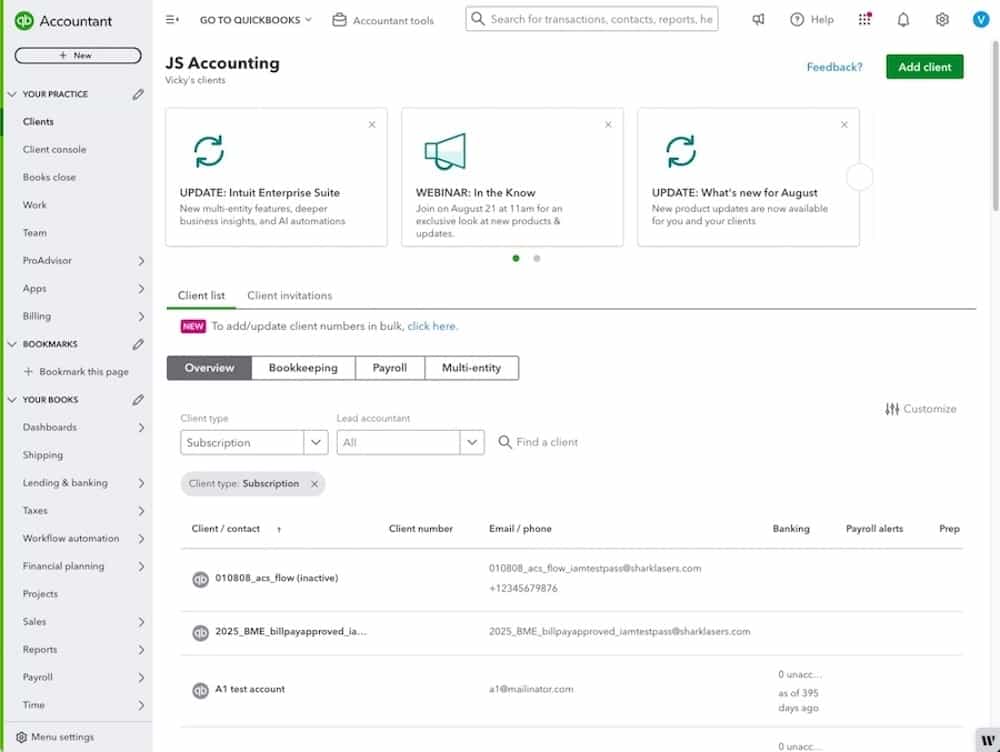
In QuickBooks Online Accountant, the Client List was your starting point.
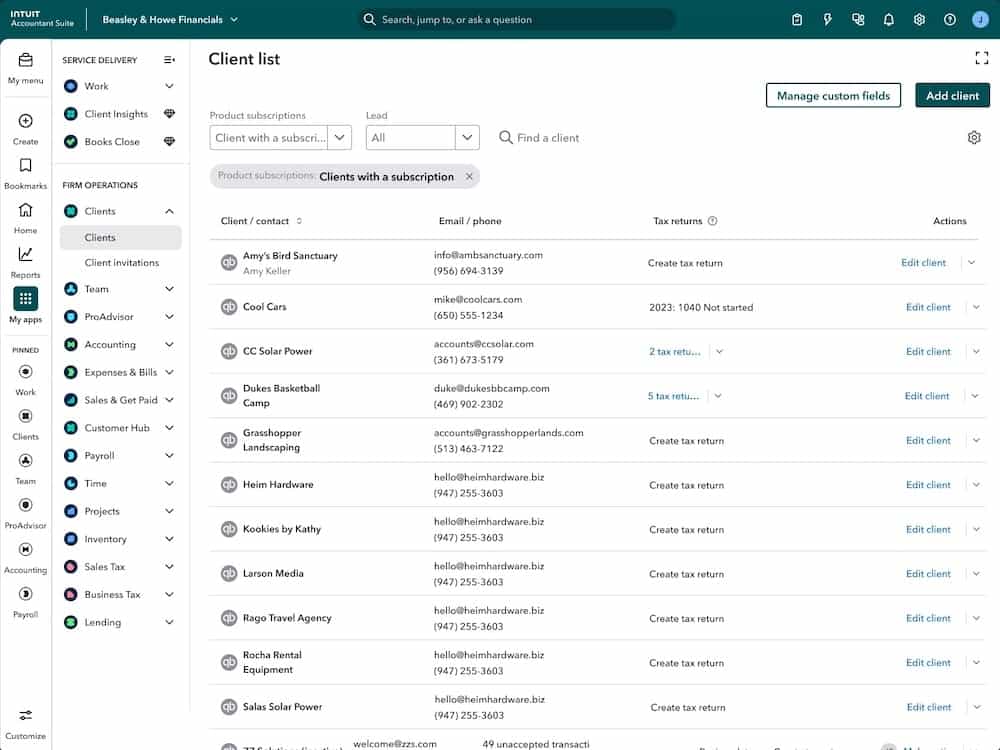
To get to your Client List in Intuit Accountant Suite, go to My Apps and look under Firm Operations. Optimised for fast performance with a large volume of clients, the Client List is designed to make it easier to maintain and easily search client records.
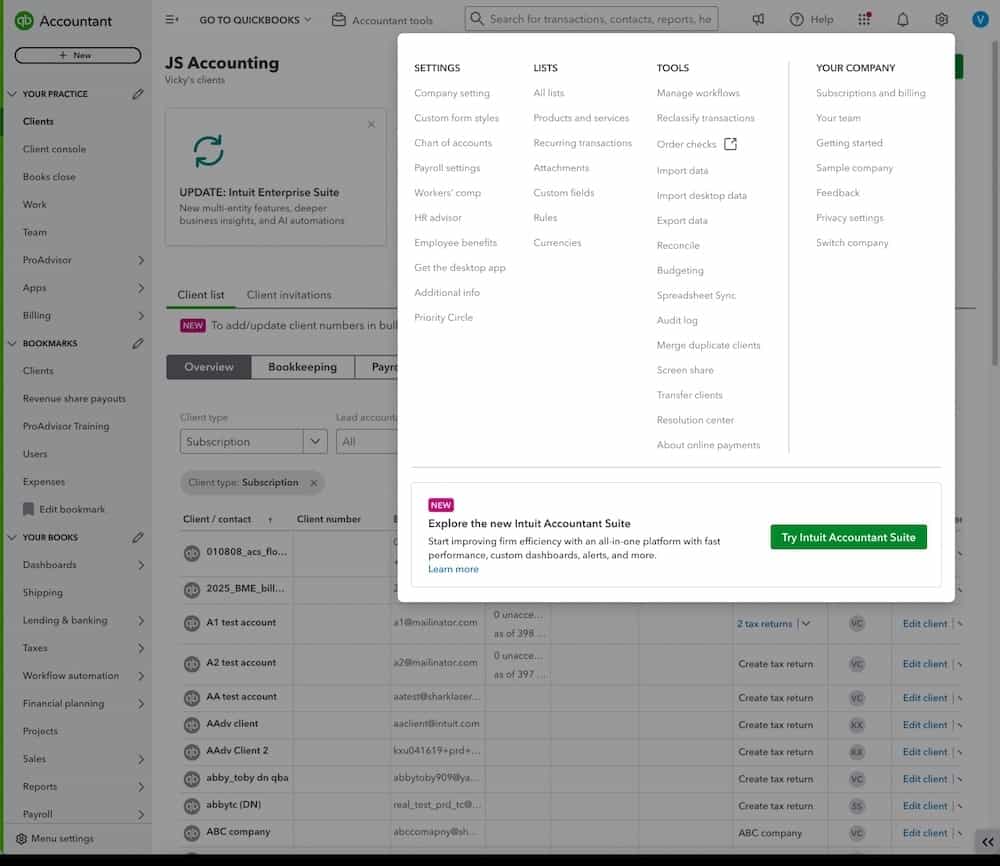
You can make the switch to Intuit Accountant Suite any time. Be sure you’re signed in as the primary admin of QuickBooks Online Accountant, then go to Settings and select Switch.
Important: When you make the switch, all your data and settings will be retained—you’ll just have a new way to interact with that data, and a lot more power and functionality.
Keep in mind that AI-driven agents may need a little time to ingest and understand your existing data before generating outputs, but once ready, they can help you work faster and more efficiently.
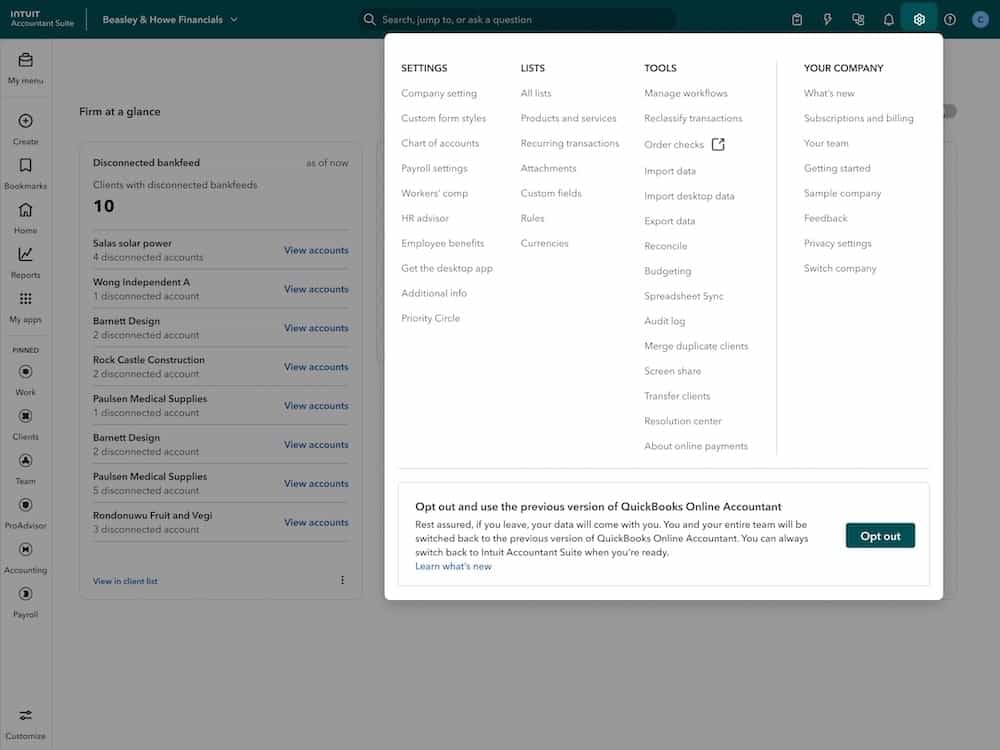
If you decide the time isn't right, your firm can switch back to QuickBooks Online Accountant from Settings inside Intuit Accountant Suite, and rejoin when you’re ready.
To get the most out of Intuit Accountant Suite, you’ll want to take advantage of the ability to manage all your clients with just one sign-in. Previously, firms managed large client lists by accumulating multiple QuickBooks Online Accountant realms. Not anymore. While a multi-account approach can sometimes be intentional and serve a specific purpose for a period of time, more frequently, this fragmentation can lead to operational inefficiencies for the firm and complicate the management of staff and clients.
As part of making the switch to Intuit Accountant Suite, we created a detailed guide to account consolidation, the process of strategically restructuring your multiple QuickBooks Online Accountant accounts into a single, unified environment. The account consolidation guide is designed to help you complete the technical steps of consolidation while also managing the organisational change for your staff.
Learn more: A Strategic Guide to Consolidating Your QuickBooks Online Accountant Accounts
We're excited for you to experience the Intuit Accountant Suite and discover how it can transform your practice. By combining the power of the Intuit platform, comprehensive client data management, and AI-powered functionality, we're confident that this new solution will empower you to boost efficiency, streamline operations, and make more confident decisions. Join us in shaping the future of accounting and powering prosperity for businesses everywhere.
DISCLAIMERS:
* This information is intended to outline our general product direction, but represents no obligation and should not be relied on when making a purchasing decision. Additional terms, conditions and fees may apply with certain features and functionality. Eligibility criteria may apply. Product offers, features, and functionality are subject to change without notice.
1 All your client files in one place: Access client files that are connected to your Intuit Accountant Suite solution.
2 Requires adding Books Close, a paid add-on to Intuit Accountant Suite. You will not be charged during the beta period. When the beta program ends in 2026, we will notify you in advance and give you the option to continue to use the product for a fee or to cancel. You can opt-out at any time.
3 Requires upgrading to Intuit Accountant Suite Accelerate, a paid plan within the Intuit Accountant Suite. You will not be charged during the beta period. When the beta program ends in 2026, we will notify you in advance and give you the option to continue to use the product for a fee or to cancel. You can opt-out at any time.
The information on this website is provided free of charge and is intended to be helpful to a wide range of businesses. Because of its general nature the information cannot be taken as comprehensive and they do not constitute and should never be used as a substitute for legal, accounting, tax or professional advice. We cannot guarantee that the information applies to the individual circumstances of your business. Despite our best efforts it is possible that some information may be out of date. Any reliance you place on information found on this site or linked to on other websites will be at your own risk.
Share:
Subscribe to get our latest insights, promotions, and product releases straight to your inbox.
9.00am - 5.30pm Monday - Thursday
9.00am - 4.30pm Friday

