

Need help choosing?
Speak to a QuickBooks expert to find the right product for your business
Talk to sales: 0808 304 6205
9.00am - 5.30pm Monday - Friday
Get product support
Contact support Visit support page
Coming soon
Rewards that grow along with you
Intuit ProPartner Accountants is built into Intuit Accountant Suite, so as you grow, you unlock real rewards: free and discounted software for your firm, access to ProPartner preferred pricing, dedicated support, training, and more.
Learn more
This information is intended to outline our general product direction, but represents no obligation and should not be relied on when making a purchasing decision. Additional terms, conditions and fees may apply with certain features and functionality. Eligibility criteria may apply. Product offers, features, and functionality are subject to change without notice.
ProAdvisor Programme - How it works
It’s simple: Earn points for doing what comes naturally, like adding clients and achieving certification. The more points you earn, the more benefits you unlock.
+5
Add a QuickBooks Ledger client
+5
Add a QuickBooks Online Core Payroll client
+10
Add a QuickBooks Online Advanced Payroll client
+10
Add a QuickBooks Online client
+25
Add QuickBooks Online Advanced client
+50
Get QuickBooks Core certified
+100
Get QuickBooks Advanced certified
Promote your practice
Get more of the clients you want. Our Find-a-ProAdvisor directory is used by thousands of small businesses and once you’re QuickBooks certified, you’ll get a free listing.

Grow your practice
Use our free marketing asset library to promote your services to new and existing clients. Create dual-branded emails, social media content and more, as you grow.
Advance your expertise
Sign up for free live webinar or online self-study training and become a certified or advanced-certified QuickBooks expert. Continue your learning with tips and tricks from our free webinars.

Expert set-up services and get started tools
Get your practice and your clients set up for success with our ProAdvisor specialist services offered by our UK Service Delivery Team.

Valuable tools and resources
Get access to real people who care about your success – our award-winning, UK-based support experts.
Take your practice to the next level with the QuickBooks ProAdvisor Programme
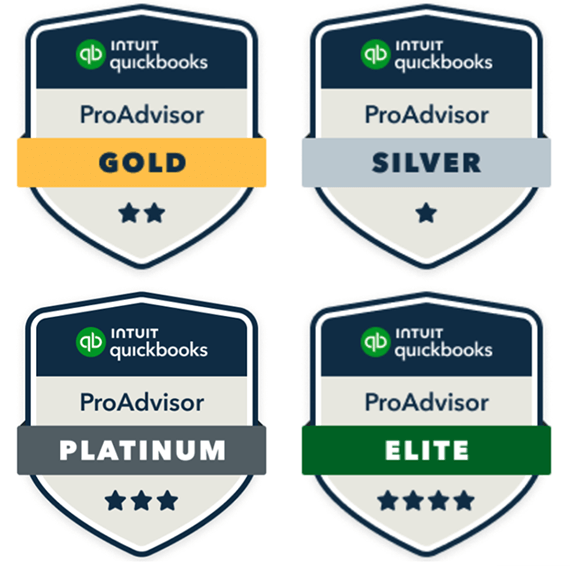
Sign up to QuickBooks Online Accountant and you automatically join our valuable ProAdvisor Reward Programme. You instantly get access to valuable tools and resources to help your practice thrive. It’s simple, as you rise through the tiers the more rewarding the programme gets.
Silver
Gold
Platinum
Elite
Points needed
0-199 pts
200-799 pts
800-2999 pts
3000+ pts
Marketing tools
Listing in the Find-a-ProAdvisor directory (certification required)
Marketing asset library
Standard
Standard +
Advanced
Advanced +
Software and services
Client analysis tool
QuickBooks Online for your practice
Discounts on QuickBooks subscriptions for your clients
QuickBooks Online Payroll for your practice
Free TSheets time tracking NEW
Discounts on DocuSign NEW
20% off
25% off
30% off
40% off
Product support
Dedicated account manager
UK-based expert customer support available on phone and messaging*
Fast-track UK-based customer support team available on phone*
Specialist support via email NEW*
Onboarding specialist to help you get up and running faster
60 days
90 days
Training
QuickBooks Online training and certification
Free Advanced Certification via classroom training
Onsite QuickBooks Online certification training for your employees**
Onsite classroom training for clients**
Frequently asked questions
Stay informed and inspired
Subscribe to get our latest insights, promotions, and product releases straight to your inbox.
