SALE

Get 70% off QuickBooks for 6 months

See plans and pricing

END OF FINANCIAL YEAR HUB

END OF FINANCIAL YEAR 2025 | KEY DATES, RESOURCES AND INFO

Get end of financial year ready with a helping hand from QuickBooks with our handy EOFY guide and plans to suit your business needs.

A black and white photo of a computer screen.

EOFY 2025 deadlines

The Australian tax year ends on 30 June, and taxes must be lodged with the Australian Tax Office (ATO) by 31 October.

Registered tax agents can lodge at a later date, but you must engage them by 31 October.

Need a tax agent? Find a ProAdvisor here.

A couple of black remote controls sitting on top of a table.

Your 2025 EOFY checklist

EOFY is an important time for businesses to submit all necessary ATO reporting. Use our EOFY checklist to stay organised and prepared for tax time.

By selecting Download the EOFY Checklist, you agree to our Terms of Service. Our Global Privacy Statement applies to any personal information provided to us.

QuickBooks EOFY Checklist

Do end of financial year differently

QuickBooks Online makes wrapping up the financial year easy. Automatically track and categorise your expenses, finalise payroll, and submit your small business tax return, all from one convenient place.

A mobile device displaying a map of the world.

Track every trip with the QuickBooks mobile app. Mark your journey as business or personal and claim money back on your driving.
Download app

A person is holding a balance sheet in their hand.

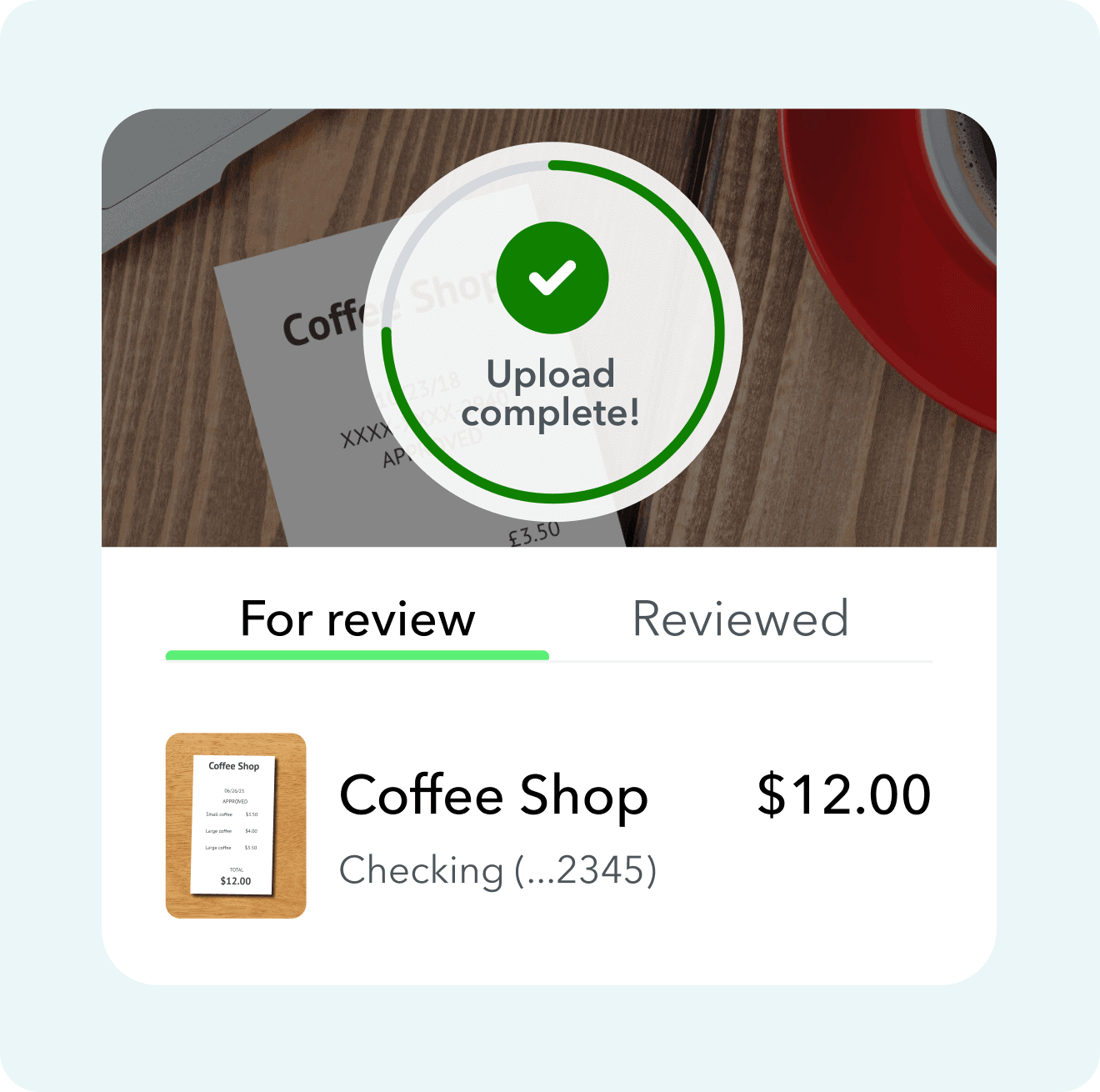
Capture your receipts on the go. We'll take the relevant data and match the details to an expense.

A person is handing a digital wallet a credit card.

Connect your bank accounts and more to have transactions automatically sorted and categorised so you're ready for tax time.

A screen shot of a tab charging a parking meter.

Enter the "What do I need to do for EOFY?" query from the Help icon and our Digital Assistant will then walk you through the EOFY process.

Find a plan that’s right for you

Free unlimited support

No contract, cancel anytime

Simple Start
Build your financial foundation
1 user
Plus access for your accountant

Includes:
Intuit Intelligence
Chat for instant insights
limited queries per month
Delegate tasks to AI
Pre-lodgement check with GST AI
Checkmark Icon
Income and expenses
Checkmark Icon
Invoices and quotes
Essentials
Save time & focus on growth
3 users
Plus access for your accountant

Everything in Simple Start, and:
Intuit Intelligence
Easily share information with your accountant with Accounting AI
Checkmark Icon
Recurring transactions
Checkmark Icon
Multi-currency
Checkmark Icon
Supplier and bill management
Plus
Scale with greater clarity
5 users
Plus access for your accountant

Everything in Essentials, and:
Intuit Intelligence
Finds and fixes errors with Accounting AI
Sources leads & helps follow up with Customer AI
Checkmark Icon
Up to 40 classes and locations
Checkmark Icon
Project management
Checkmark Icon
Inventory tracking
Checkmark Icon
Budgeting
Unlock efficiency
Accelerate
Advanced
Boost efficiency & profitability
25 users
Plus access for your accountant

Everything in Plus, and:
Intuit Intelligence
Gives tailored financial insights with Finance AI
Pre-fills details to start work faster with Project Management AI
Checkmark Icon
Unlimited classes and locations
Checkmark Icon
Automated workflows
Checkmark Icon
Custom role permissions
Checkmark Icon
Custom reporting fields
Checkmark Icon
Data sync with Excel
Checkmark Icon
Backup and restore data

Compare all features

Simple Start
Essentials
Plus
Unlock efficiencyAccelerate
Advanced
Intuit Intelligence Icon
Intuit Intelligence
Chevron Icon
Intuit Intelligence chat
Beta
Checkmark Icon
Checkmark Icon
Checkmark Icon
Checkmark Icon
Accounting AI
Checkmark Icon
Checkmark Icon
Checkmark Icon
Checkmark Icon
GST AI
Checkmark Icon
Checkmark Icon
Checkmark Icon
Checkmark Icon
Customer AI
Dash Icon
Dash Icon
Checkmark Icon
Checkmark Icon
Finance AI
Dash Icon
Dash Icon
Dash Icon
Checkmark Icon
Project Management AI
Dash Icon
Dash Icon
Dash Icon
Checkmark Icon
Accounting Icon
Accounting
Chevron Icon
Automated bookkeeping
Checkmark Icon
Checkmark Icon
Checkmark Icon
Checkmark Icon
GST tracking & e-lodge BAS
Checkmark Icon
Checkmark Icon
Checkmark Icon
Checkmark Icon
Automated bank feeds
Checkmark Icon
Checkmark Icon
Checkmark Icon
Checkmark Icon
Smart expense categorisation
Checkmark Icon
Checkmark Icon
Checkmark Icon
Checkmark Icon
Multi-currency
Dash Icon
Checkmark Icon
Checkmark Icon
Checkmark Icon
Anomaly detection and resolution
Dash Icon
Dash Icon
Checkmark Icon
Checkmark Icon
Revenue recognition
Dash Icon
Dash Icon
Dash Icon
Checkmark Icon
Fixed assets
Dash Icon
Dash Icon
Dash Icon
Checkmark Icon
Classes and locations
Dash Icon
Dash Icon
Up to 40
Unlimited
Chart of Accounts
250
250
250
Unlimited
Expenses Icon
Expenses
Chevron Icon
Auto-match transactions
Checkmark Icon
Checkmark Icon
Checkmark Icon
Checkmark Icon
Expense tracking
Checkmark Icon
Checkmark Icon
Checkmark Icon
Checkmark Icon
Receipt capture
Checkmark Icon
Checkmark Icon
Checkmark Icon
Checkmark Icon
Kilometre tracking
Checkmark Icon
Checkmark Icon
Checkmark Icon
Checkmark Icon
Supplier and bill management
Dash Icon
Checkmark Icon
Checkmark Icon
Checkmark Icon
Sales & Get Paid Icon
Sales & Get Paid
Chevron Icon
Quotes
Checkmark Icon
Checkmark Icon
Checkmark Icon
Checkmark Icon
Invoice and payments
Unlimited
Unlimited
Unlimited
Unlimited
Recurring invoices
Dash Icon
Checkmark Icon
Checkmark Icon
Checkmark Icon
Customer Hub Icon
Customer Hub
Chevron Icon
Customer management
Checkmark Icon
Checkmark Icon
Checkmark Icon
Checkmark Icon
Notes and tasks management
Checkmark Icon
Checkmark Icon
Checkmark Icon
Checkmark Icon
Reputation management
Dash Icon
Checkmark Icon
Checkmark Icon
Checkmark Icon
Lead management
Dash Icon
Checkmark Icon
Checkmark Icon
Checkmark Icon
Contract upload and e-signature
Dash Icon
Dash Icon
Checkmark Icon
Checkmark Icon
Proposals
Beta
Dash Icon
Dash Icon
Checkmark Icon
Checkmark Icon
Appointments
Dash Icon
Dash Icon
Checkmark Icon
Checkmark Icon
Project Management Icon
Project Management
Chevron Icon
Project management
Dash Icon
Dash Icon
Checkmark Icon
Checkmark Icon
Project profitability
Dash Icon
Dash Icon
Checkmark Icon
Checkmark Icon
Inventory Icon
Inventory
Chevron Icon
Inventory tracking
Dash Icon
Dash Icon
Checkmark Icon
Checkmark Icon
Purchase orders
Dash Icon
Dash Icon
Checkmark Icon
Checkmark Icon
Sales orders
Dash Icon
Dash Icon
Checkmark Icon
Checkmark Icon
Business Intelligence
Chevron Icon
Insights & reports
Checkmark Icon
Checkmark Icon
Checkmark Icon
Checkmark Icon
Cash flow planner
Dash Icon
Checkmark Icon
Checkmark Icon
Checkmark Icon
Budgeting
Dash Icon
Dash Icon
Checkmark Icon
Checkmark Icon
Forecasting
Dash Icon
Dash Icon
Dash Icon
Checkmark Icon
Custom dashboards
Dash Icon
Dash Icon
Dash Icon
Checkmark Icon
Custom report builder
Dash Icon
Dash Icon
Dash Icon
Checkmark Icon
Custom fields
Dash Icon
4
4
12
Connected Platform
Chevron Icon
Data sync with Excel
Dash Icon
Dash Icon
Dash Icon
Checkmark Icon
Users
1 user
3 users
5 users
25 users
User management and role permissions
Dash Icon
Basic
Basic
Custom
Workflow automation
Dash Icon
Dash Icon
Dash Icon
Checkmark Icon
Mobile app
Checkmark Icon
Checkmark Icon
Checkmark Icon
Checkmark Icon
Integrate with hundreds of apps
Checkmark Icon
Checkmark Icon
Checkmark Icon
Checkmark Icon
Autosave with data protection
Checkmark Icon
Checkmark Icon
Checkmark Icon
Checkmark Icon
Backup and restore data
Dash Icon
Dash Icon
Dash Icon
Checkmark Icon
Free onboarding session
Checkmark Icon
Checkmark Icon
Checkmark Icon
Checkmark Icon
Phone & chat messaging support
Checkmark Icon
Checkmark Icon
Checkmark Icon
Checkmark Icon
Free data migration
Dash Icon
Checkmark Icon
Checkmark Icon
Checkmark Icon
Automated Payroll
Checkmark Icon
Checkmark Icon
Checkmark Icon
Checkmark Icon

FREE onboarding session for new customers

Our expert will walk you through the key features of QuickBooks, but they’re unable to offer business or financial advice. The QuickBooks features demonstrated can be tailored depending on your needs. The session can cover; invoicing, expenses and setting up bank feeds

Live chat person screen on a computer
A person sitting at a table with a laptop.

Find a tax professional
to help you this EOFY

Manage your end of financial year obligations and share your finances in real time with your accountant, bookkeeper or financial advisor.

Frequently Asked Questions

A black and white image of a price label on a computer screen.

Take the stress out of end of financial year

Transform your end of financial year workflow, boost your team's productivity and power through tax time with these guides and tips.

Guides

Discover expert tips to improve your EOFY workflows, drive efficiencies with your tech stack and improve your engagement process.

Turning workload into workflow: Your ultimate guide to EOFY

Discover how a proactive approach to managing your clients, processes and technology will save you time and headaches this EOFY season.

Your EOFY checklist

A step-by-step checklist to help you close out the old year and prepare for the new one with the tools in the QuickBooks suite.

A black and white photo of a person in a white shirt.

Speak to an EOFY expert

Whether you're looking for a better way to lodge BAS, a more productive way to prepare tax lodgements, or just want to create winning workflows, QuickBooks Online Accountant can help. Speak to our team about the efficiencies you can achieve with QuickBooks.

Frequently Asked Questions
