Absolutely! @Toni-Cimring. You can export your HST Payable account details to Excel from QuickBooks Online (QBO). I'll provide instructions to complete this task, ensuring your business can proceed smoothly.
This process will enable you to have a detailed view of all transactions affecting your HST Payable account for the specified period.
For your convenience, here's a step-by-step guide:
- Log in to your QBO account.
- Navigate to the Gear icon and select Chart of Accounts.
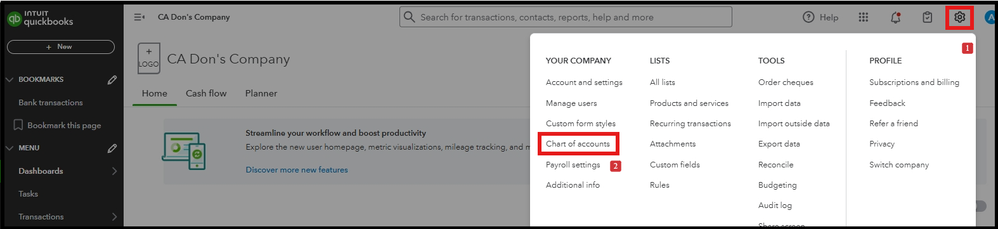
- Choose the HST Payable account you want to export.
- Hit the drop-down arrow under the ACTION column.

- Click the Run report option.
- Review the report's details and tap the Export option.

- Choose Export to Excel.
Once done, go to your Downloads folder to open the file.
I'll also share this resource to help you learn more about exporting various reports within the program: Export your reports to Excel from QuickBooks.
By following these steps, you'll be able to transfer your HST Payable account information into an Excel spreadsheet. If you need any further assistance or have questions about the exported data, please don't hesitate to ask. I'm here to help!


