Hello, Flair111. The error message "Please fix the errors below and try again" suggests that some required details have not been completed.
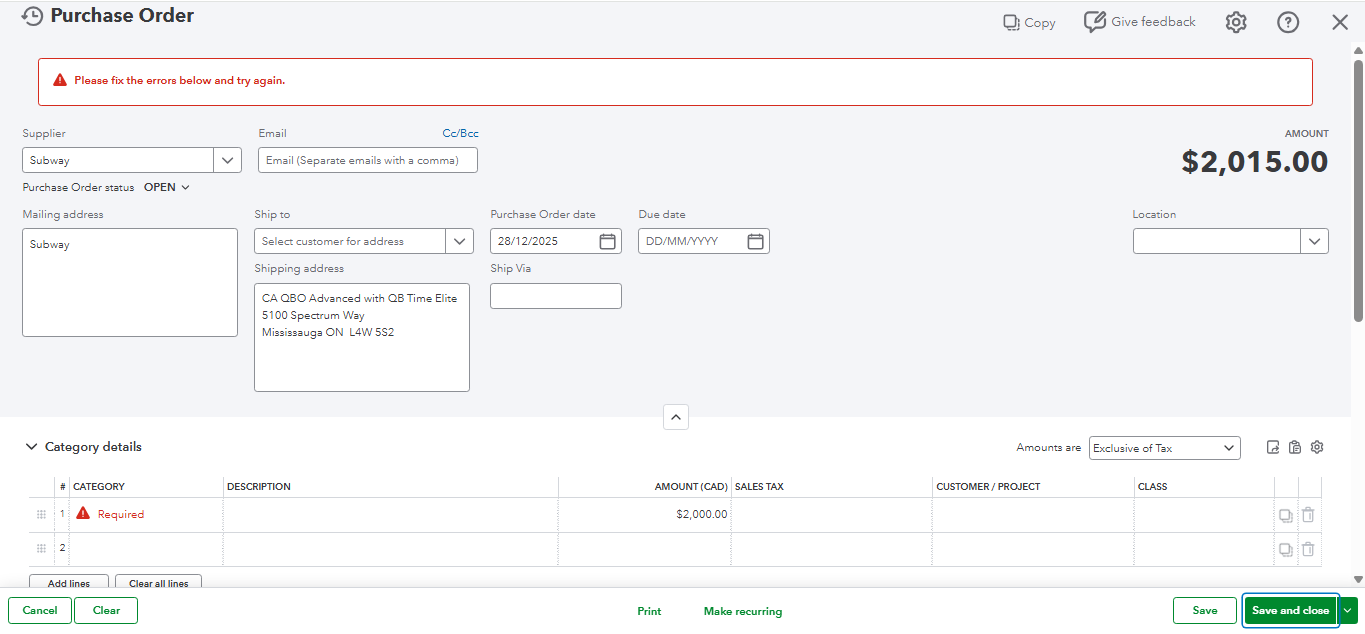
To resolve this, check the Category or Product/Service fields in the Item details section of the purchase order. Ensure all fields marked with a red Required indicator are filled out before saving. If these required details are missing, the system will not allow the purchase to be saved.
Here's a sample screenshot that shows what happens when the Category or Line item fields are left empty:
If all required fields are completed but the error persists, we can try a few troubleshooting steps to resolve the issue.
First, let's refresh your browser to help reload the page and clear minor issues or cached data that might be causing the error.
Next, log out and log back into your QuickBooks Online account to help reset your session and fix temporary glitches related to the browser. A fresh login ensures a proper reconnection with the system.
Lastly, if the issue persists, try accessing your QuickBooks account through a private or incognito browser. This bypasses any browser extensions, cookies, or cached files that could interfere with the system. Alternatively, switching to a different supported browser, such as Google Chrome, may enhance performance and resolve compatibility issues.
If you have any further concerns, please feel free to reach out. We're here to help.


